
Progressive Disclosure
Your Game Master can only hold so much in its head at once. Progressive disclosure is the idea that an AI should start with a small, focused set of information and pull in more detail only when it needs it.
You already know how this works. When you prep for a tabletop session, you don't memorize every NPC's backstory, every room in the dungeon and every rule in the book. You keep a few notes in front of you, know roughly what's in your binder, and look things up when the moment calls for it.
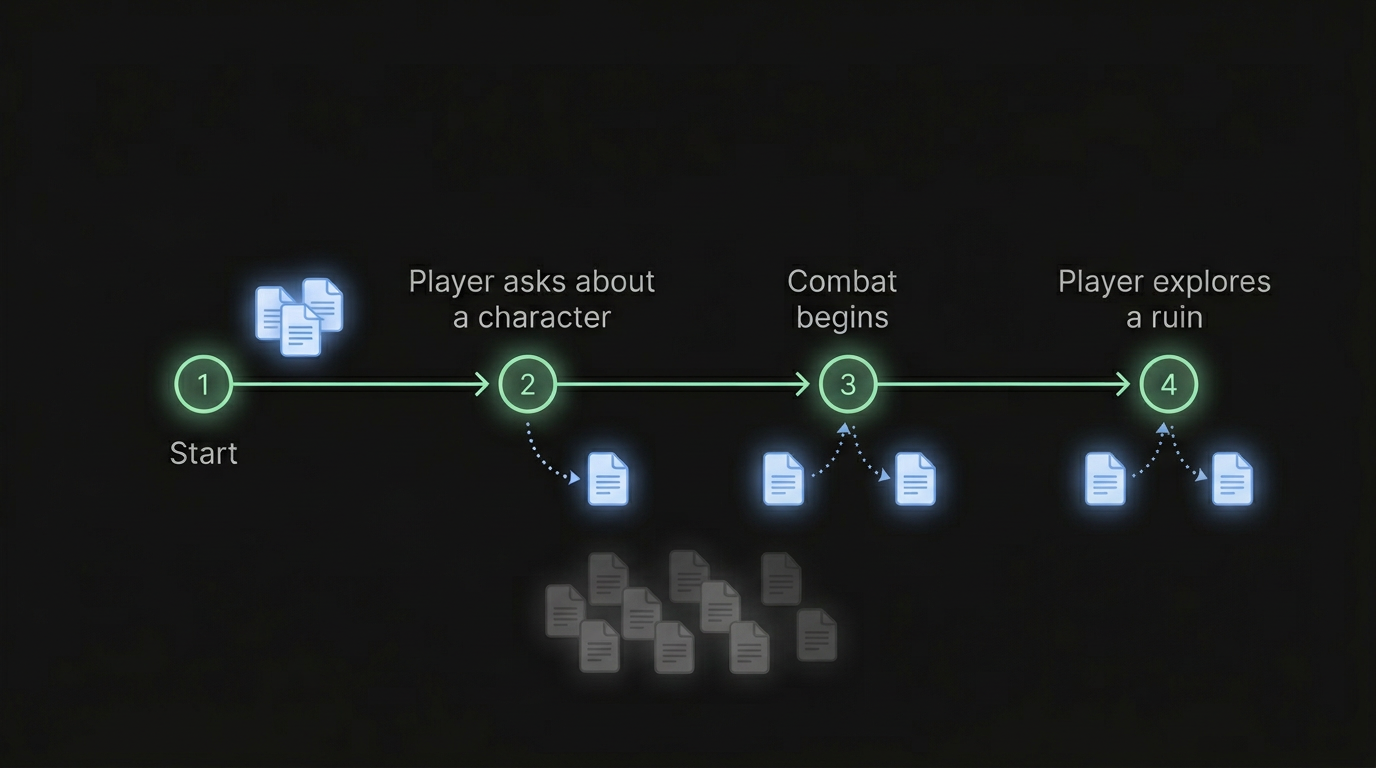
Craft's Game Master works the same way, and it does the sorting for you. You don't decide which files it keeps in mind. It starts each turn with a short picture of the game, then looks up what the moment needs.
Why it matters
When an AI has too much loaded at once, a few things go wrong:
- Important details get lost. Imagine reading a 50-page document and then being asked about page 23. The more you're holding, the harder it is to focus on what matters now.
- Responses slow down. More to read means a longer wait for every reply.
- Instructions compete. Rules written for different moments start to blur together, and the AI hedges instead of making confident calls.
The answer isn't less content. It's the right content at the right time. See Context Rot for more.
What the GM has every turn
- Its instructions. Craft's own, your always on GM Instructions, and the instructions from the player options the player picked.
- An outline of your world. Your file types and their fields, your folders, and how many files each type has. Not the files themselves.
- A list of your procedures. Each one's title and when to use it, not its steps (see Procedures).
- The scene. The player's character, where the party is, the places that place sits inside, what's drawn on its map, and the current state: who's in the scene, where they stand, and your trackers.
- The story. A summary of the game so far, the latest chapter in full, and the recent turns word for word (see Game Memory).
- The rules for this moment. Up to five situational GM Instructions whose moment is happening, placed right beside the player's move.
What the GM looks up
Everything else, it fetches when the story calls for it:
- List shows the files in a folder, or every file of a type.
- Read opens a file, or just the fields it needs, like a character's skills. It also reads a procedure's steps when its moment comes.
- Research answers a question in plain words ("What does the Ember Crown do?") from your files and the game's memory. See The Research Tool.
When a player walks up to Captain Reva, the GM reads her file. When they ask about the War of Silver Thorns, it researches it. Neither was taking up space until that moment.
Build a world that's easy to look up
The GM finds things the way you would: by name, by folder and by following links. A few habits make that work:
- Name files what people call them. The GM finds a file by its name, by words in it, and by close spellings, so "Captain Reva" is easier to find than "NPC 14".
- Give each thing its own file. One file per person, place, item and faction. A single "Everyone in the city" file is harder to look up than forty short ones.
- Put the key facts first. Open each file with what it is and why it matters. When a question names a file, research reads its opening along with whatever else it found.
- Link related files. Research follows reference fields and mentions, so a question about a character can bring back their faction and home too.
- Use folders and types that say what's inside. When the GM lists a folder called Taverns, it knows where to look.
- Hide what the GM should never use, like your own notes or an old draft. See Context Visibility.
And write as much lore as you like. A file the GM isn't using costs nothing, and the richer your world is, the better its answers get when players dig in.
Where things go
| Content | Where it goes | Why |
|---|---|---|
| Your world's premise, tone and core roll | An always on GM Instruction | The GM needs it on nearly every turn |
| How bartering works | A situational GM Instruction ("When a player barters…") | It arrives only on turns where someone barters |
| How a fight's rounds run, step by step | A procedure | The GM sees its title every turn and reads the steps when a fight starts |
| Difficulty or tone players can choose | A player option | Only the choice the player picked goes to the GM |
| Characters, places, factions and items | Files, one each | The GM reads them when they come up |
| History, deep lore and reference tables | Files | Research finds the part a question needs |
| Your design notes and drafts | Hidden files | They're for you, not the GM |
The GM starts every turn knowing its instructions, the scene and the story so far. As players head into specific corners of your world, it pulls in exactly what it needs. That's progressive disclosure: the right information, at the right time, in the right amount.
Orbit, your building assistant, works differently. It isn't running a game, so it reads whatever files your request needs, hidden or not.