
Maps and Locations
Maps in Craft are built out of your locations. Every place in your world is a location file, and any location can carry a map of its own. A world map holds its regions, a region holds its towns, a town holds its taverns, and you click your way down from one map to the next. You can stop at any level: a one-shot can live on a single tavern map, and a sprawling campaign can stop at its continents.
Your maps are also where the game happens. The GM keeps every scene on a map: who is where, which ways lead out, how far the next town is, and who is standing within reach of whom. This section covers how to build maps that play well, not just look good.
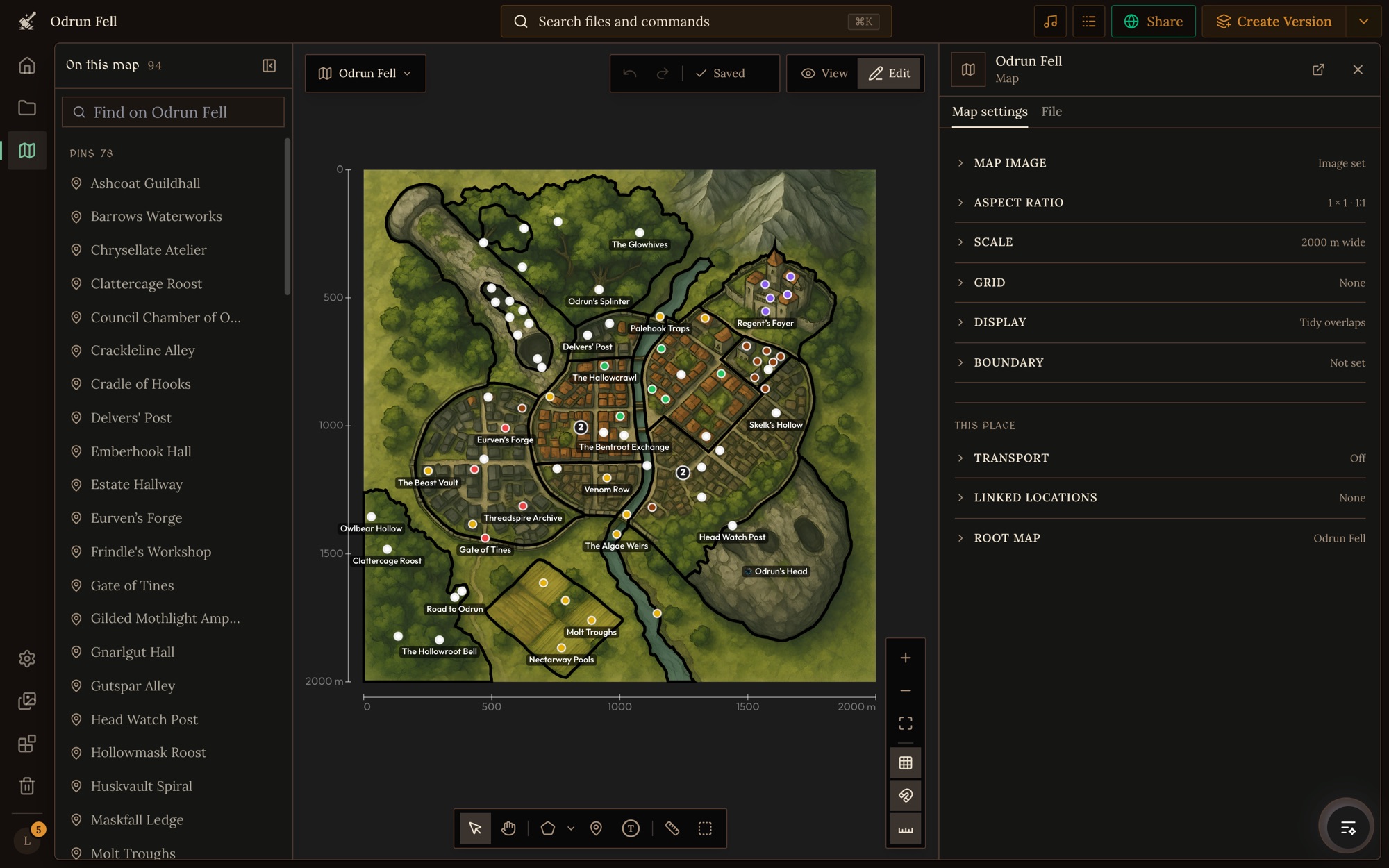
Locations are files first
A location is any file whose type has the Location designation, usually kept in a Locations folder. The file holds the place's name, description, picture and whatever other fields your location type has. Its map is part of the same file, so cloning, versions, packages and game saves all carry the map with it.
Shapes on a map point back to files. You don't draw a region and then write notes about it: you write the location, then draw a pin or an area on a map and link it to that file. Clicking the shape opens the place, and its own map is the next level down.
How places connect
There are three ways to say how two places relate:
- Drawn on a map. A pin or area on one location's map, linked to another location. It says "this place is here": the Gate of Tines is a pin on the Odrun Fell map, and the Spindle is an area outlined on it.
- An exit. A pin or area that is a way to another location: a door, a stair, a town gate, a portal. It says "you get there from this spot".
- A linked location. How two places relate with no spot on a map: rooms of the same building, a cellar under the kitchens, a road between two towns, a city's reflection in another realm.
A location can also be a transport, such as a ship or a caravan that people board and ride. Exits and Linked Locations covers exits, linked locations and transports.
The root map
The project's root map is the top of the tree: the map that opens first in the Maps view, the one players start from when they open the world map in a game, and the one visitors can pan around on your world's page. In a project with no maps yet, the Maps view offers to create a world map or pick an existing location for it. To change it later, open the current root map and pick another location under Root map in its Map settings.
What the GM reads from your maps
The GM doesn't just look at your map's picture. It reads the scale to work out distances and travel times, plays fights in squares on gridded maps, finds the features drawn in your map image, places characters where their tokens are, and follows your exits and linked locations when the party moves. A few settings make a big difference, and How the GM Uses Your Maps explains each one.
In this section
- Drawing Maps: the map editor, its tools, and every map setting.
- Exits and Linked Locations: doors, stairs, parts of a place, roads between towns, and transports.
- How the GM Uses Your Maps: scale, grids, tokens and what players can do with your maps.
Coming from Friends & Fables? Its maps are one infinite canvas you zoom into. Craft's are nested: each place can have its own map with its own scale. Moving a World from Friends & Fables to Craft covers bringing your maps over.
You can also build maps without the editor. Ask Orbit, the project assistant, to draw on a map or link places (see Agent Tools).
Or use the Craft CLI's map and meta commands, listed in the Command Reference.