
How the GM Uses Your Maps
Every scene happens on a map. The GM keeps track of where the party is, who is standing where, which ways lead out, and how far it is to the next place. It reads all of that from your maps, so a few settings change how well your world plays. This page goes through them.
Set a real scale
A map's scale (Map settings, then Scale) says how wide the whole map is. The GM uses it to work out:
- how far apart places are, and how long it takes to get between them (on foot by default, or by the way of travel the story names);
- whether a place sits inside another or just next to it;
- whether a map is ground where a scene plays out (a room, a building, a camp) or country you travel across (a region, a kingdom).
Give every map its real width: "75 ft" for a hall, "2000 m" for a city, "300 mi" for a kingdom. A map with no scale leaves the GM guessing at distances. A scale of exactly 1 mile counts as no scale too, because it was the default on older maps; if a map really is a mile across, enter 1.6 km instead. If your files say how long a journey takes, the GM uses that instead of measuring.
Grids for fights
When a place's own map has a square grid and a real scale, the GM plays scenes there in squares. It knows each person's square, how far everyone is from whoever is acting, and who is within reach. It uses each token's size (its Footprint in grid squares, or the creature's size, so a Large creature takes 2 × 2) and the grid's Measurement rule for diagonals.
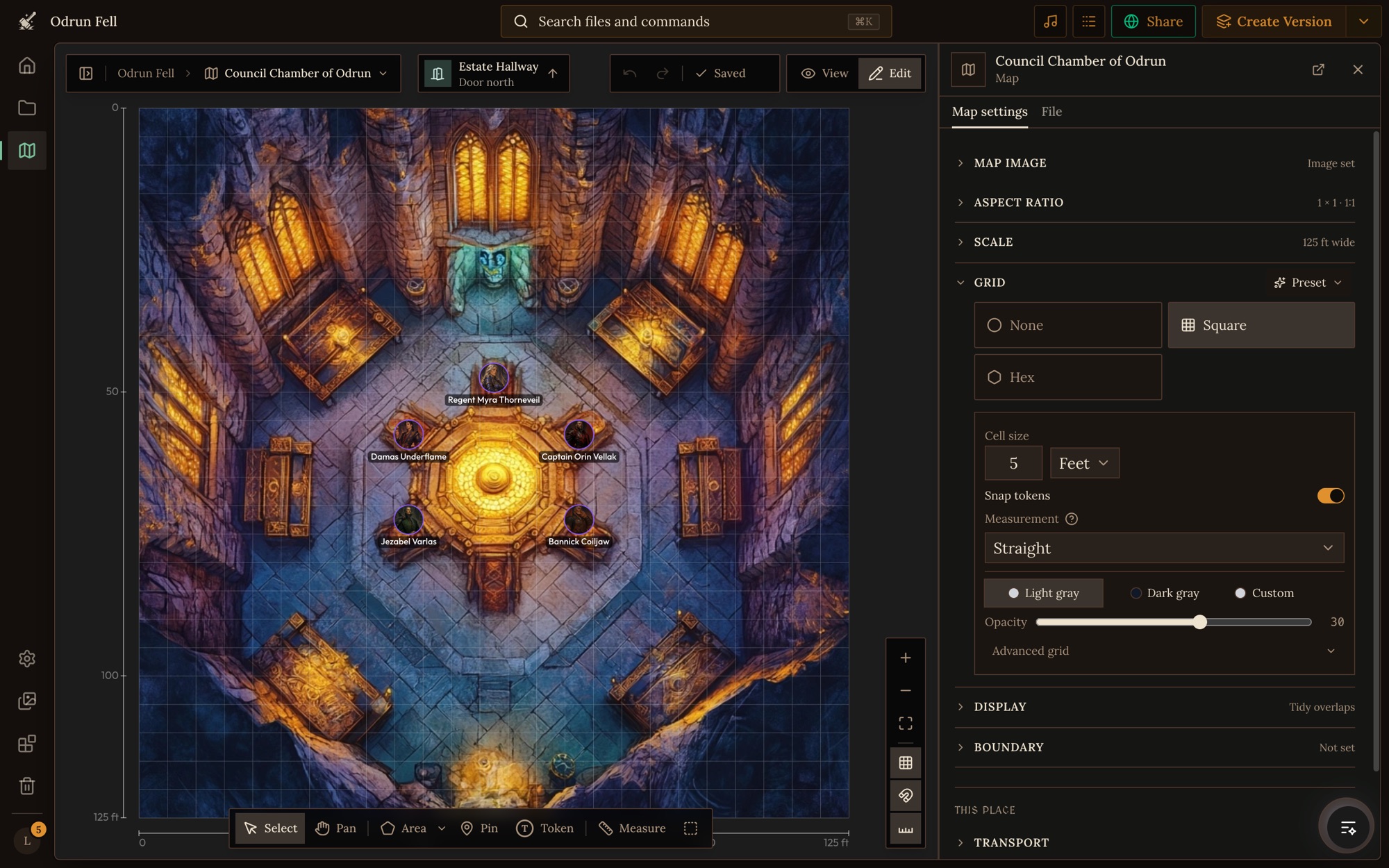
Add grids where fights and tense scenes happen: rooms, lairs, camps, a ship's deck. Hex grids, and places that use their parent's map, aren't played in squares. A grid on a wide map (a region, a continent) doesn't make it a battlefield either: on maps that wide, every move is a journey.
The GM reads your map image
When you set a map's image, Craft looks at the picture and notes the features drawn on it, such as the bar, the windows, the main gate or a well. The GM uses them to place people ("she waits by the window") without you pinning every table. Maps that existed before this are read the first time a game uses them.
Your own areas and pins always come first. Name them the way players will talk about them ("The Throne Dais", not "Area 3"), and draw the ones the story depends on even if they're visible in the picture. If you replace the image, the new one is read again.
Tokens say where characters are
Character files don't have a "location" field. A character's token on a location's map is what says where they are:
- Characters with a token on the starting location's map are there when a game starts (see Game Starts).
- When the party arrives somewhere, characters with tokens on its map join the scene, unless the story has sent them elsewhere.
- When a player says "let's go see Marta", the GM heads for the place whose map has Marta's token.
So put a token, linked to the character's file, on the map of wherever each important character lives or works. In a game, players don't see your tokens as such: the GM's scene shows who is actually there, where they stand.
Which map a place belongs to
A place's parent decides what it is "within" during play and where the world map's breadcrumbs lead. The GM decides it in this order:
- A linked location that says the place is part of another one (see Exits and Linked Locations).
- Otherwise, the most detailed map that draws it. A tavern pinned on both the city map and its district's map belongs to the district.
- If two maps disagree, a parent field on your location type (such as "Parent Location") settles it.
Use parent map means a place has no map of its own, so its scenes play on its parent's map. That suits a waystone or a market stall. For anywhere people will fight, sneak or explore room by room, give the place its own map with a scale.
What players can do with your maps
In a game, the map card in the corner shows the current scene, and players can open it up to see more:
- The world map. The world map button shows the maps above the scene, from your root map down to where the party is. Clicking a place shows its picture, where the party would leave from, Open Map and Travel. Travel lets them choose who comes along, then sets out as a turn of its own.
- Moving people. Players can drag anyone on the scene's map. The move goes with their next turn, so the GM sees it before it writes.
- Adding people. Add to the map puts someone into the scene, and each token's menu can move them, change their size or side, or remove them.
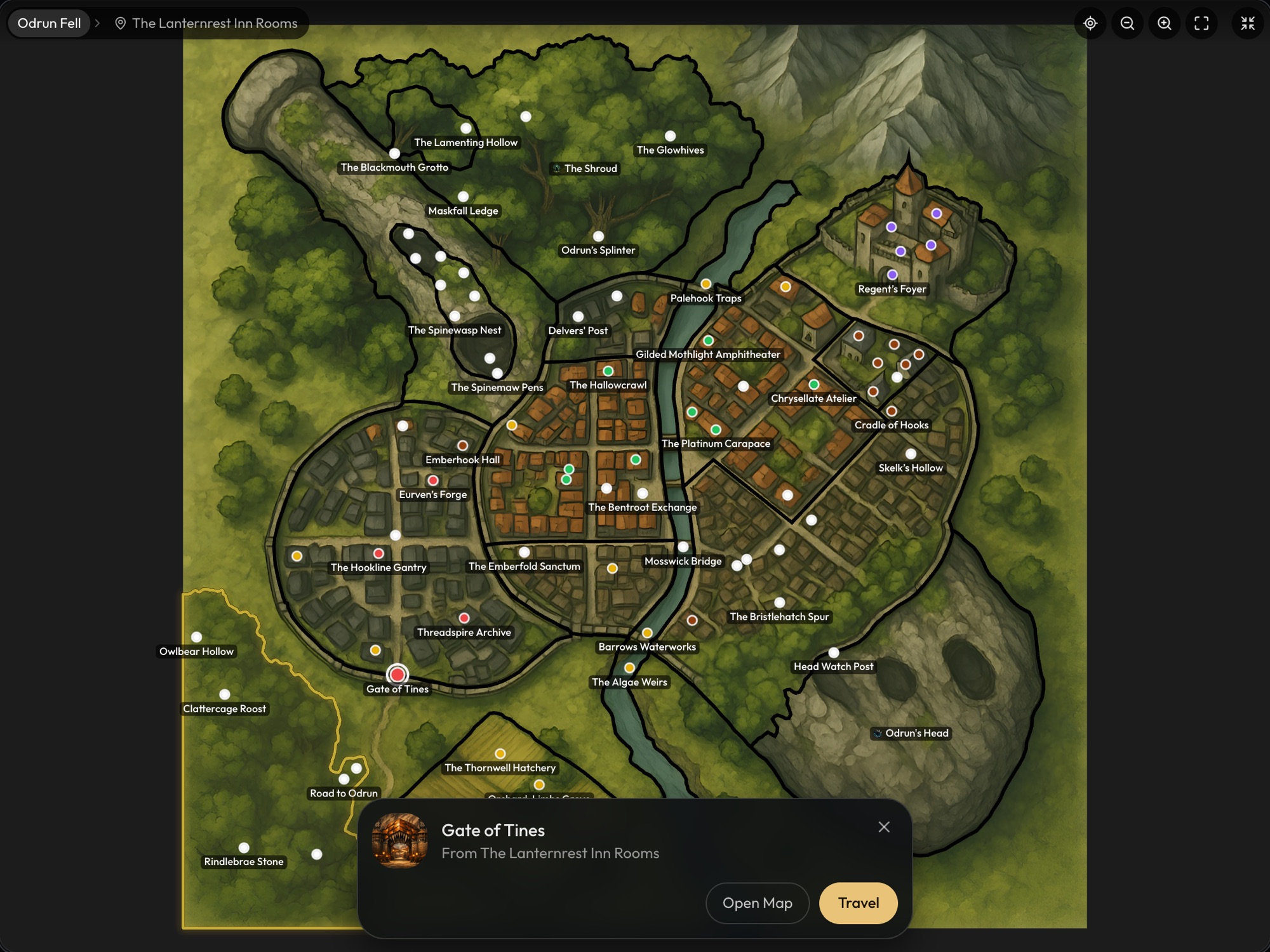
Players never see exit markers or linked-location badges, so hidden doors and secret passages stay secret until the story reveals them.
Places the GM makes during play
When the story goes somewhere your world doesn't have, the GM makes the place in that game and gives it a picture and a map sized to fit: a battle map for a camp or a room, a town plan for a village, a regional map for wild country. A part of an existing place, like a cellar found under the kitchens, becomes a linked location of that place rather than a pin. These places live in that game only. Your project doesn't change.
A checklist
- A root map, with your major regions and places drawn and linked.
- A real scale on every map.
- Square grids on the maps where fights happen.
- Every place that matters drawn on a map or linked to one, with exits or linked locations for the ways the story uses.
- Tokens for your important characters, where they live or work.
- Areas and pins named the way players will say them.
- A last look in View mode, to see each map the way players will see it.