
Using the CLI with Coding Agents
Using local agents like Claude Code + Craft CLI is the most powerful and cost efficient way to build projects in Craft. The Craft CLI comes loaded with instructions and skills, so your agent is always up to speed on the best practices of building a Craft project, and you never need to remember or run commands yourself. Just tell the coding agent what you want!
Coding agents will be able to do pretty much anything you can do in the app such as
-
Generate & Upload Images
-
Draw on maps, add exits and link locations
-
Write GM Instructions, player options and trackers
-
Set up game starts and playable characters
-
Create preludes
-
Update your project showcase page
-
Publish versions
-
Start new projects from systems
-
and more!
Every cloned project carries guides for the agent in
.craft/instructions/: building a world, authoring maps, linking
locations, making a world playable, writing GM Instructions, and more. The
agent reads the one it needs as it works, so you don't have to explain how
Craft fits together.
The easiest route to use local agents + Craft CLI is with the Claude Code or ChatGPT Codex desktop apps. You can download either of them here:
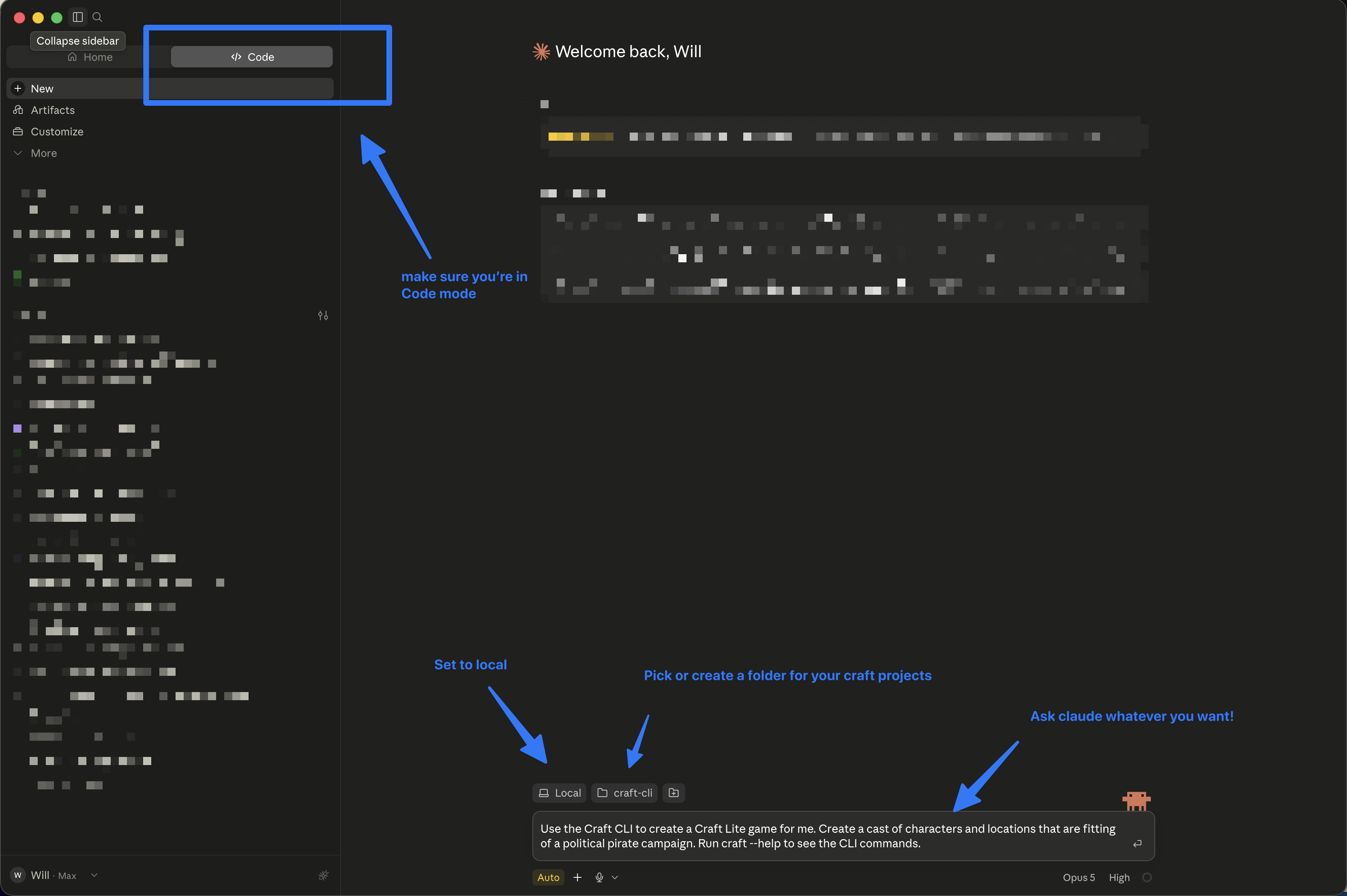
Once you have one of them downloaded, simply open the desktop app.
-
Make sure you're in Code mode
-
Make sure you're set to "local"
-
Pick or create a folder on your computer to house your craft projects
-
Set yourself to "Auto" mode
-
Prompt away! Try editing and using this prompt:
            Claude, please use the Craft CLI to create a [SYSTEM NAME, D&D
            5e.., Craft lite..] game for me. Create a cast of characters and
            locations with [WRITE YOUR CUSTOM INSTRUCTIONS HERE]. Run craft
            --help to see the cli commands.
Any terminal coding agent works. These are the ones we test with:
|
Agent |
Install |
Start |
|---|---|---|
|
Claude Code |
|
|
|
Codex |
|
|
|
opencode |
|
|
|
Cursor |
|
|
|
Gemini CLI |
|
|
Install the agent you picked — Claude Code here:
npm install -g @anthropic-ai/claude-code
Clone the project you want to work on:
craft clone <projectId>
Move into the folder the clone created:
cd <project-folder>
Start the agent there:
claude
From there, just describe what you want changed. The agent edits files,
checks its work, and syncs straight back with craft push — no
zipping — and pulls down anything that changed in the app with
craft pull.
Prefer to skip the CLI entirely? A coding agent can also edit an exported zip directly — see CDF Import & Export.