
Game Starts
A Game Start is a saved opening for a project. It's everything a new game needs to begin: a starting location, the characters players can pick, and how the GM kicks off the first scene. When someone starts a game from your project, they pick a Game Start from the lobby and play begins from there.
A project can have as many Game Starts as you want. You might offer a tutorial start, a "drop into the action" start, and a slower "session zero" start, and let the player choose.
What a Game Start Sets Up
Every Game Start has these parts:
- Name and image. What players see in the game lobby.
- Description. A short pitch for what this opening is about.
- Lobby order. Where this Game Start appears relative to others.
- Starting location. The place the party begins. Required.
- Playable characters. Which characters players can choose from at the start.
-
Opening. How the GM begins the first turn. See below. The
Opening panel also holds:
- Opening current state. Who is in the current state as the game opens, what the scene is for, the party's first objectives, and how the world's trackers start, the in-game time among them.
- Opening notes. Facts the GM reads on its first turn instead of looking them up, so the story starts sooner.
Opening Modes
You can pick one of two ways for the GM to open the game. Scripted is the recommended mode: the story starts the instant a player picks a character, while a dynamic opening makes them wait for the GM to write the first turn.
Scripted
The game opens with your scripted lines, exactly as written. A scripted opening is a list of beats — each beat is either GM narration or a line of dialogue from a character. Character beats show that character's portrait and play like any line the GM writes.
The quick chips under the beat list keep common speakers one click away: the GM, characters linked to your starting location (placed on its map or mentioning it), and anyone already speaking in the opening. Each beat also has a + button to add another beat from the same speaker.
Each beat can carry an expression — a delivery cue picked from the speaker's expression states (or the GM's default set for narration). When the character has a matching portrait variation, the story view swaps it in for that line; without one, the base portrait shows.
Dynamic
The GM follows your instruction to generate the first turn. You write what should happen, like "open with a tense scene, one sensory detail, and a question to the selected character." The GM improvises within that frame. Use this when you want freshness over exact wording.
Some things a dynamic opening is good for:
- Plant story seeds. Have the GM pick a rumor, a clue and a stranger from your world and weave all three into the first scene.
- Introduce the party. Give each character a distinct entrance to the scene.
- Show off a mechanic. Open on a skill check or a clock ticking, so the player sees how your system works from the first turn.
Per-Character Openings
By default one scripted opening plays for everyone. When the game start has selectable characters, a tab for each appears under the Scripted choice. Pick a character's tab and choose to write them a custom opening — when a player picks that character in the lobby, their version plays instead. Everyone else gets the All characters opening, which is always required as the fallback. A character opening starts as a copy of the fallback so you can tweak it rather than rewrite it, and a dot on the tab marks characters that have one. Per-character openings apply to scripted openings only.
The Opening Current State
The current state is what the play screen's map and the GM both read: who is in the scene, where they stand, and what is going on. When a game begins, anyone with a token on the starting location's map is already there, along with the player's character. The opening current state, in the Opening panel, sets the rest.
The opening scene shows the starting location's map beside a Who's here list. Switch between GM's view (everyone in the current state, with hidden people in violet) and Player's view (what the player sees on the first turn).
Edit map opens the map editor so you can move the tokens. If the place has no map yet, Draw a map starts one; the people you add still join the scene without it. Characters with a token on the map start there, and Add character brings in anyone else. For why tokens matter after the first turn, see How the GM Uses Your Maps.
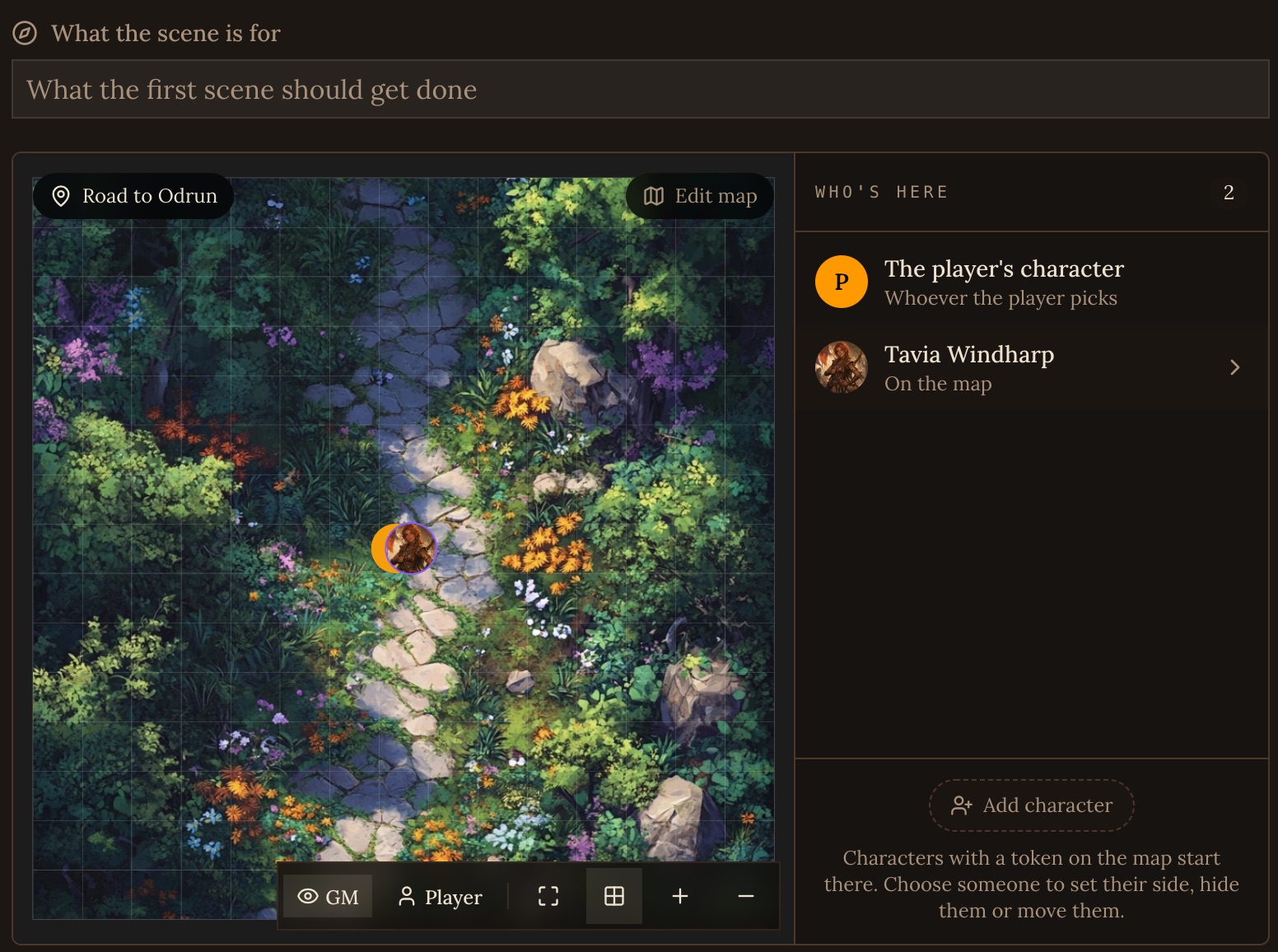
- Who's here. Add characters who should be present even without a token, or add someone from the map to change how they start. Each person can be on a side (ally, neutral or enemy), stand in one of the map's areas (otherwise they stand by the player), be hidden from the party (unseen, sensed or disguised), and carry a note only the GM reads.
- What the scene is for. The opening scene's purpose and where it could go next. The GM keeps it in the current state as play moves on.
- Objectives. What the party is working toward from the first turn, as they know it. The GM adds later objectives as the story gives them, and marks each one done or failed.
- Trackers. The in-game time the story opens at, and which of the world's trackers are in the current state as the game opens and what they start at in this game: Supplies at 2 in a start that opens after a shipwreck, a Heat clock already a third full, a clue the party begins with. The time is always in the current state; write it the way your world tells time, or leave it empty and the GM says it once the story does. A tracker you don't change starts the way its tracker template says, in every game start.
The player sees the current state the moment they enter the game, before the GM has written a word, and hidden people and opening notes stay off their screen.
Opening Notes
Before its first reply, the GM usually looks up the people and the place the story opens on, and the player waits while it does. Opening notes give it those answers up front. On its first turn the GM reads them beside the opening current state and treats them as facts it already knows, so it can start narrating straight away.
Give the GM all of the detail the opening needs. The more the notes cover, the fewer lookups the GM makes and the sooner the game starts. Good notes cover:
- Who the people at the start are, what they want, and how they talk.
- What the place holds: its rooms, what is for sale and at what price.
- What is going on that the party doesn't know yet.
Write facts rather than direction. The notes stay with the GM until the game's history is first summarized, and players never see them.
Picking the Right Tool
If you're not sure where a piece of setup belongs, use this rough guide.
| If you want to... | Use... |
|---|---|
| Set the first message word for word | Scripted opening |
| Let the GM improvise the first scene from a brief | Dynamic opening |
| Put people in the current state, set the time or give the party a goal | Opening current state |
| Tell the GM what it needs to know to open without looking it up | Opening notes |
| Start a tracker on, off or at a different value in this opening only | Opening current state's Trackers |
| Apply a rule to every turn of the game | An always on GM Instruction |
| Apply a rule when a moment comes up, in any game | A situational GM Instruction |
| Provide background lore the GM can look up | A regular file |
See Also
- The Game Master. Where your GM Instructions, tracker templates and player options live.
- Trackers. What the world's trackers keep and how they start.
- Writing GM Instructions. How to write instructions the GM will actually follow.