
Context Visibility
Every file in your world is either visible to the Game Master or hidden from it. Visible is the default, and it's the right setting for almost everything.
The GM doesn't read your whole world every turn. It starts with a small picture of the scene and looks up the files the moment needs (see Progressive Disclosure). Visibility decides what it's allowed to find. A visible file is one it can look up, read and change. A hidden file doesn't exist as far as the GM is concerned.
Visible
"The Game Master can find and read this file." A visible file is part of the GM's view of your world:
- The GM can find it when it lists a folder or a file type, and can read it whole.
- It can come back in research answers.
- The GM can update it when the story changes it, like a character's HP or a shop's stock.
Being visible doesn't put a file in front of the GM. A visible file costs nothing until a turn needs it, so a library of a thousand lore entries is fine.
Hidden
"Completely hidden from the Game Master." A hidden file is left out of everything above. The GM can't list it, read it, find it with research, or change it. Hiding a file reaches the GM's lookups within a few seconds, even in a game that's already running.
When to hide a file
Hide a file when the GM finding it would make the game worse:
- Your own notes. To-do lists, design notes, ideas you haven't settled on.
- Drafts and old versions. An abandoned take on a faction, or a rules file you've replaced but aren't ready to delete. If two files disagree, the GM may use the wrong one.
- Duplicates. Two copies of the same rulebook, or an import that left a second set of files behind.
- Material for you, not the game. An art style guide, a changelog, a reference you copied in while building.
Don't hide a file just because it's long or rarely used. The GM only reads what a turn needs. And keep secrets visible: the GM needs to know the villain's plan to run it well, even when the players don't.
Setting visibility
On a file. Hover a file in the file tree and click the visibility button at the end of its row, or use the same button in the file editor's toolbar. Each click flips the file between visible and hidden, and a short note says where it now stands: "Visible to the GM" or "Hidden from the GM". A hidden file's button stays showing in red, so you can spot hidden files at a glance.
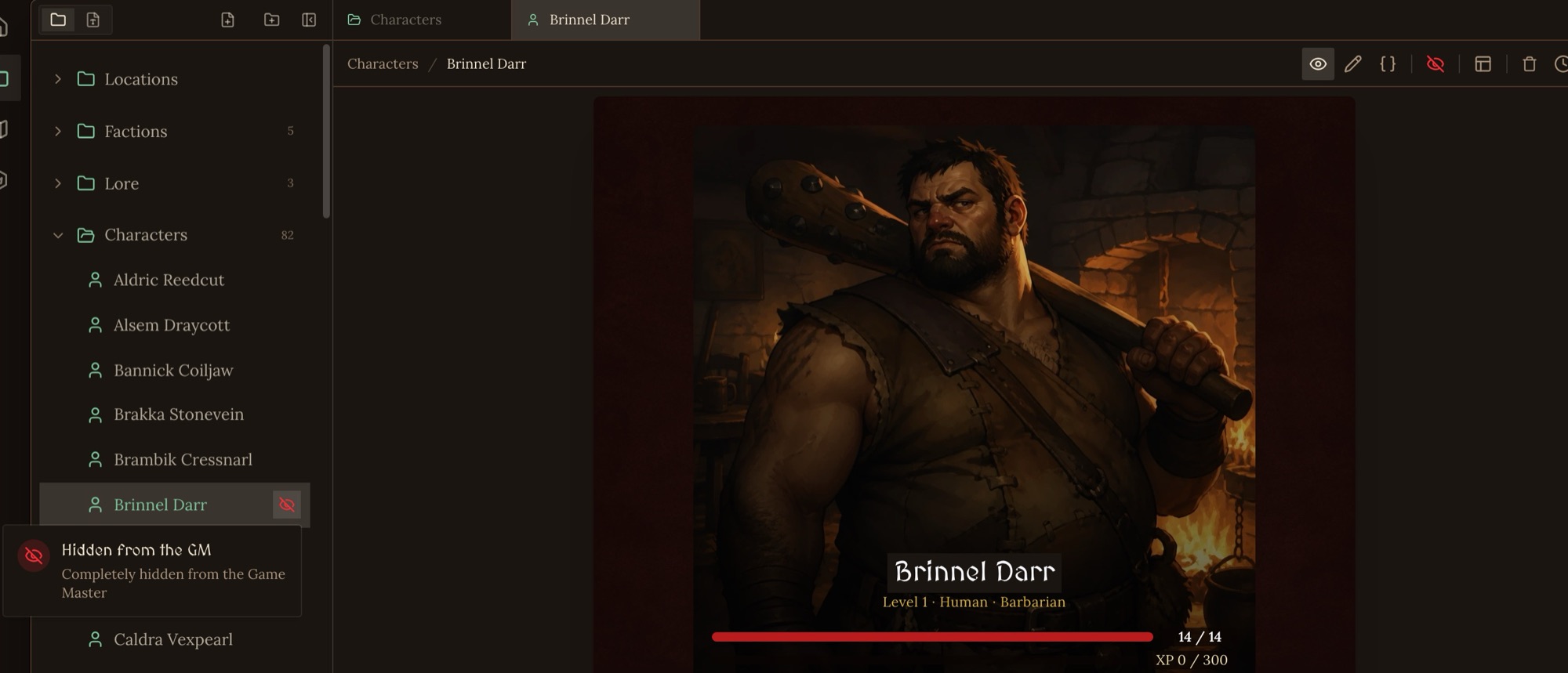
On a file type. Edit a file type and set its Default Context Visibility to Visible or Hidden. Files of that type follow it unless you've set the file itself. Hide a whole type when every file of it is for you, such as a Design Notes type.
A file's own setting wins over its type's. A file with neither set is visible.
Orbit sees everything
Visibility only applies to the Game Master. Orbit, your building assistant, sees and edits every file in your world, hidden or not, so you can still ask it about your notes and drafts.
For more on what the GM reads each turn, see Progressive Disclosure and Context Rot.