
About Craft
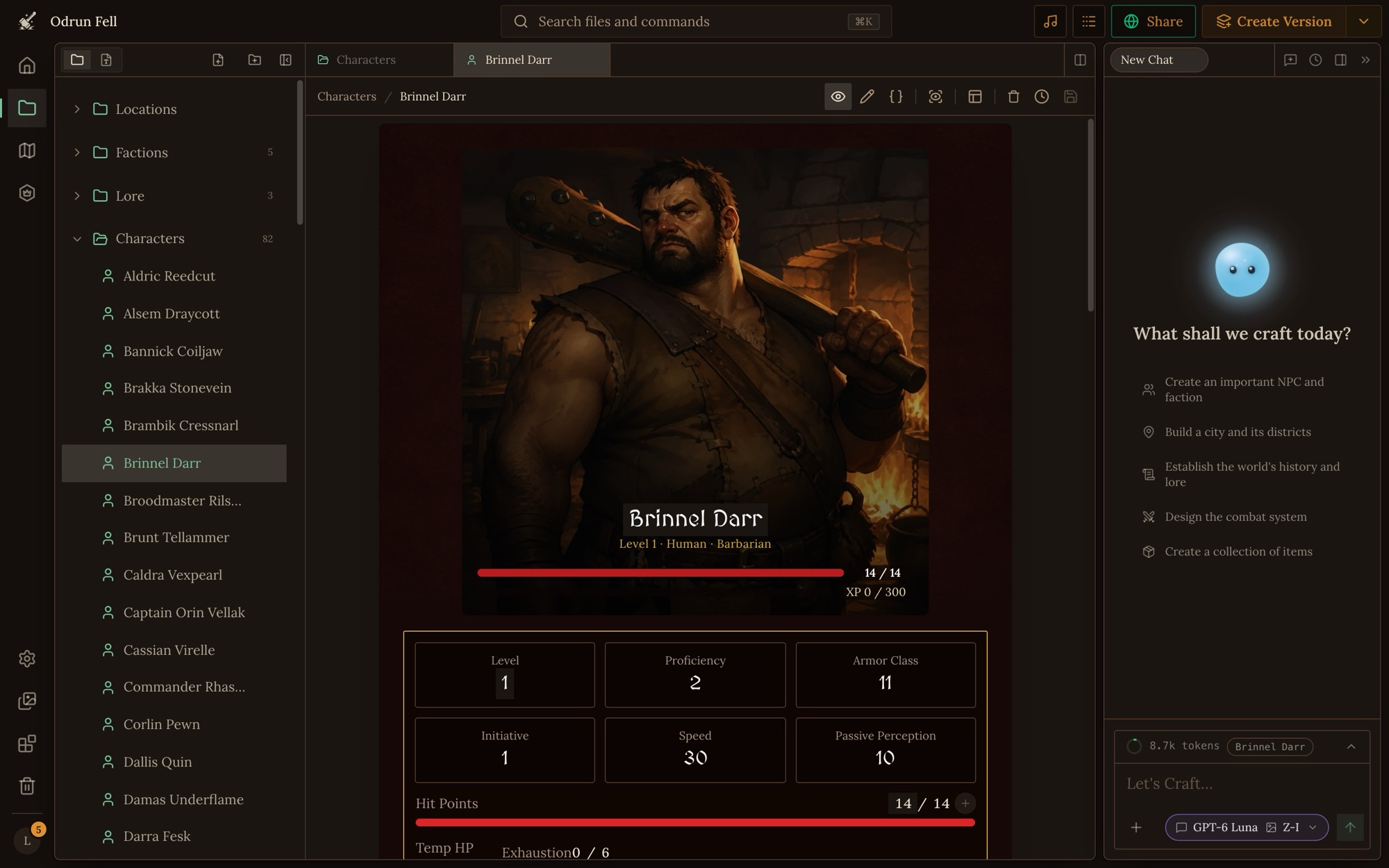
Craft is a platform for building and playing AI tabletop RPGs. You build a world: its people, places, items and rules as files, how each kind of file looks, and the rules its Game Master follows. Then people play it. An AI Game Master (the GM) tells the story, rolls the dice, moves the party across your maps and keeps every sheet up to date, so a game reads like a visual novel and plays with the freedom of a tabletop RPG. Craft isn't tied to one ruleset. D&D, Pathfinder, Fate or a system you invent all work, because you write the rules in plain words, and in code where they must come out exactly.
How it is used
Craft has two sides, building and playing, and the same world moves between them.
- Build a project. Click Create at the top of the app (the + on a phone), or create one with the Craft CLI. Many projects start from a published system, which gives them file types, rules and GM instructions to build on. Others start blank or from an import. A new world opens on its First Steps checklist.
- Fill it with files. Characters, places, items, rules and lore, each a file of a file type. Draw maps, write the GM's instructions, and set up how a game opens.
- Play test it. Start a game from your world, play a few turns, and fix what the GM gets wrong.
- Publish a version. A version is a frozen copy of the whole project. Once there is one, new games start from the latest version, not your draft, so you can keep building.
- People play it. Each game is its own copy of the version it started from. A game's owner can pull in the world's newer versions, and the world's owner can push a game's fixes back into the world as a new version.
You build in the project workspace in the app, with Orbit beside you, or in a folder on your computer with the Craft CLI.
Projects: worlds and systems
A project is what you build in Craft. Every project is one of two types, chosen when it is created and changeable later in its settings:
| Type | What it is |
|---|---|
| World | A playable setting: its people, places and rules. Games are started from a world, and most projects are worlds. |
| System | A rules framework for others to build on. It isn't played: people create a world (or another system) from it, so a system is always clonable. |
A project holds:
- Files in free-form folders: one record each, like a character, a place or a page of lore. See files.
- File types, the blueprints files are made from: the fields a file stores (its schema), how it looks (its layout), and whether Craft treats it as a person, a place or another special kind (its designation). See file types, layouts and references and computed fields.
- Settings for the whole project: its name, its page, its art direction, the GM's name and voice. See project settings.
- GM instructions and player options: the rules the GM follows and the choices players make for their game. See GM instructions.
- Trackers, the counts and lists the GM keeps in play: the time, objectives, a fight's turn order, a clock. See trackers.
- Maps on location files, and links between places that aren't on a map. See maps and linked locations.
- Game starts, the openings players pick from. See game starts.
- Pictures on files, in one art style. See images.
- Scripts, rules written as JavaScript that the GM runs, in worlds where scripts are on. See scripts and dice.
- A prelude and creation flows: the intro a new game plays and the guided way a player makes a character. See flows.
- Handbooks for people: a Player's Handbook and a Builder's Manual. See handbooks.
- Visual novels, stories readers click through, made from a game or written from scratch. See visual novels.
Games
A game is one playthrough of a world. Click Start game on the world's page, or Start Game at the top right of the workspace (if it's your world, it's in the menu beside Create Version).
- A game is its own copy. It copies the world's latest version: its files, file types, GM instructions and settings. Before a world has a version, games copy the live project. When the owner starts a game while the world has changes no version holds yet, Craft asks first: play the latest version, or create a new one. Changes in a game stay in that game, and changes to the world reach a game only when it pulls an update. See game sync.
- Before play, a world with a prelude plays it. Then the player picks a game start and a character (or makes one). The lobby's settings button changes the game's settings (the model that runs the GM, the world's player options, where pictures come from); without a change the game starts on the world's defaults.
- During play, the player writes what their character says or does, and the GM replies. The story arrives page by page, with the scene's map, the dice, the changes to each sheet and the trackers around it.
- Between turns, the player can change things by hand: a value on a sheet, a file, a tracker, a player option. The GM is told what changed at the top of the next turn, and plays from the new values. See fixing a game.
- Pinned files sit in the game's side panel for players to open during play, like a faction or a house rule. A world sets the ones new games start with, and a game's owner can change their own game's.
- The game's owner pays for its turns, on the owner's energy or credits. See energy and credits.
See your game for where your character's gold, gear, level and party are kept and how to change them, and managing your games for starting over, deleting and copying a game.
The Game Master
The GM is the AI that runs a game. It reads the world's files and rules, tells the story, and records what changes. It reads the world's GM instructions and player options, keeps its own memory of the game, and keeps the scene in the game's current state: where the party is, who is there and where they stand, the time, and the trackers. It finds, reads and edits files by id, and runs the world's scripts where scripts are on.
What you give the GM, and where it belongs:
| You want the GM to… | Put it in |
|---|---|
| Know a fact about the world | A file it can find |
| Follow a rule always, or at a moment | GM instructions |
| Work a rule out exactly, every time | A script |
| Keep count of something the player watches | A tracker |
| Open a game a certain way | A game start |
| Move the party between places | Maps and linked locations |
Orbit
Orbit is the AI assistant built into every world. It is not the GM: the GM runs play, and Orbit helps you build. Ask it to write and reorganize files, design file types and layouts, write GM instructions, draw on maps and make pictures. In a game, Orbit is the out-of-character channel for rules questions, lookups and fixes. See Orbit.
The Craft CLI
The Craft CLI keeps a project in sync with a folder on your computer. You clone a world, edit its files with any editor or a coding agent (Claude Code, Codex and the like), and push the changes back, through the same checks and version history as an edit in the app. See the Craft CLI. To move a whole world as a zip, see import and export.
Sharing
- Versions and visibility. A project is private until you share it: with anyone who has the link, or with everyone on Discover. Players play its latest version. See publishing.
- Cloning. A world can let others copy it into a project of their own. A published system always can.
- Packages share a slice of a project, like a pack of spells, for other creators to install. See packages.
- The content policy says what can be made and shared, and how shared worlds are rated. See the content policy.
- Earnings. Creators earn credits when other people play their worlds, or worlds built on their systems, and can receive tips. See energy and credits.
Everything you make or upload, across every world, also lands in your own media library. See the studio.
Where to go next
| To… | Read |
|---|---|
| Plan and build a world from the start | Building a world |
| Play a game, or find where your character's things are | Your game |
| Repair a game that went wrong | Fixing a game |
| Design a world's rules | Designing a game system |
| Design XP, levels and level-ups | Designing progression |
| Understand how the GM and Orbit read a world | Working with AI |
| Change many files at once | Bulk work |
| Fix or tidy a world's file types | Improving file types |
| Look up a limit | Limits |
| Look up a word | Glossary |
Doing it well
- Build the smallest world that plays. One place, a few people, a character to play and a game start is enough to play test. Grow it from what play shows is missing.
- Start from a system when one fits your rules. Its file types and rules are a tested base.
- Set the art direction and the GM first. They shape every picture and every turn that comes after.
- Put each thing where it is used. Facts in files, rules in GM instructions, exact procedures in scripts, counts in trackers. See where things go.
- Play test often, and fix in the world, not only in the game.
Mistakes
- Asking Orbit to run the game. Orbit builds and answers questions. The GM tells the story, and where the party is changes only with a turn.
- Fixing the world inside a game. A change in a game stays in that game until the world's owner pushes it back.
- Expecting players to see your draft. New games start from the latest version. Create a new version to ship changes, and existing games get them only when their owner pulls the update.
- Trying to play a system. A system is for building on. Create a world from it to play.