
Patch Notes B0.050 - GM Harness 2
Introducing GM Harness 2
Today we're launching GM Harness 2, a new Game Master Harness for Craft, built from the ground up.
Part of our strategy was to focus on world-building features at launch. We wanted to make Craft the best place to build AI RPG content, and we needed the platform to be filled with worlds worth playing in. After seeing some amazing content start to fill up the platform, we decided it was now time to dedicate our attention back to the play experience. After all, what's the point of having all of these worlds if the gameplay isn't also amazing?
Craft's first Game Master Harness was built on the same architecture as Orbit, our world-building assistant. That's a great design for building worlds, but it turned out to be the wrong one for running a game, as it resulted in slow response times and a GM whose context window was overrun with non-narrative details.
So we rolled up our sleeves and designed a new, specialized harness for running games in Craft. Here are some things you can expect from GM Harness 2:
- 10-20x faster on average. Less waiting, more playing.
- Every model feels smarter. Even the lightest ones write better.
- Redesigned UI. A more immersive player experience.
- Player options. A simpler way to customize your experience.
- The map moves with the story. Every step, every roll and every blow plays out as you read it.
- Far better memory. A new default memory system that allows the GM to remember things from thousands of turns ago.
- Improved state tracking. You'll find the GM is much better at keeping sheets up to date.
- New map and travel systems. We're pretty sure it's the best travel and map system in any AI RPG available.
- Free and fast in-game images. For maximum immersion, of course.
New worlds start on GM Harness 2 today, and existing worlds can upgrade in a few minutes. Here's everything that's new.
Up to 60x faster
In most games, turns are 10 to 20 times faster than before, and in some games they're up to 60 times faster.
We accomplished this by focusing on optimizing pre-narration processes, like research. The GM is now able to research information about your world in seconds, which means it can get to narrating much faster than before.
Every model feels smarter and more capable
With Harness 2, we were able to simplify the system-level instructions and context, freeing the GM to focus more on weaving a good story and following your instructions. Every model will feel better in Harness 2, but you'll feel the biggest jump on lightweight models like GPT-6 Luna, MiMo V2.6 Flash and GLM 5.3 Flash.
Travel that makes sense
“Take me to the old mill” sounds simple, but for a GM it's one of the hardest calls in the game. Is the mill on the map you're on, or across town? Is it a room, a building, or a day's ride away? Do you walk in now, or set out on a road? Does the world even have a mill yet? Get it wrong and the party ends up in the wrong room, or right back where it started.
So we built GM Harness 2 to stop guessing. Behind the scenes, it reads your world's maps as one graph: every place, what it sits inside, the doors, roads and docks between them, how far apart they are, and who's standing where. With that graph, every move a player makes is one of four kinds:
- Moving within the place you're in. “I walk over to the bar.” A step across the map you're on.
- Going to another place. “We head down to the cellar.” Its map opens, with the party at the way in.
- Arriving at a place on another map. “Take us out to the Old Mill.” The GM finds the way through town and along the road, knows how long it takes, and moves the clock forward.
- Starting a journey. “We set out for Saltmarsh.” The trip becomes a road you travel a stage at a time, or skip straight across, as your Long-distance travel option says.
And when you head somewhere the world doesn't have yet, the GM makes it. It names the place to fit your world and draws its picture and a map at the right scale, from a single room to a whole region.
Getting there is part of the game too:
- Travel from the map. From the scene's map, go up to the region and world maps, pick a destination and choose Travel, or Travel With to pick who comes along.
- Ships, caravans, airships and trains carry the party between places.
- A record of the road. The journey view shows where you set out, your stops, where you are and where you're headed.
- The world stays put. Companions travel with you, and anyone you left behind is still there when you come back.
For creators: maps that know how places connect
Your world's maps can tell the GM how to get around:
- Mark areas and pins as exits, such as doors, gates, stairs, roads, docks or portals, and say where they lead.
- Set a location up as a Transport for ships, caravans, airships and trains.
- Use Linked locations to say a place is inside or connected to another, without pinning it on a map.
The GM reads all of it, plus what's in your map images, so “the east end of the bridge” lands at the east end of the bridge. To dig more into how these new location and travel features work, check out the documentation here: https://www.craftrpgs.com/docs/exits-and-linked-locations
The map moves with the story
Every step, roll and blow plays out on the map as you read it, and everyone is right where the story says:
- Spells glow in their element's color.
- Tokens shake when they're hit.
- Conditions show on the people they affect.
When a fight starts on desktop, the map slides out to sit beside the story. Smaller moments, such as arrivals, exits and checks, play quietly on the corner map without interrupting you. On a big screen you can keep the map beside the story at any time, and drag the divider to share the space.
Better memory out of the box
In the first GM harness, we used a file-based memory system where world builders would instruct the GM how to read/write memories to files. This worked to some degree, but we realized everyone was rebuilding the same thing. File-based memory was also not as efficient and had a performance ceiling. So we decided we needed to go back to a native memory system.
We spent some time developing a new, improved system that uses vector embeddings to recall information from any point in your campaign. Theoretically, your GM should be able to remember details from thousands of turns ago. This also means that world builders have one less thing to worry about.
To set expectations here, it's really hard to get perfect long-term memory. The more details there are in a campaign, the bigger the haystack becomes. We just want to be clear that the default memory should feel much better, but players should not expect it to be perfect. With only so much time in alpha, there were only so many long campaigns. We'll have to give you all some time to reach 1k+ turn campaigns in beta so that we have more data and feedback to improve it further in future updates.
A more immersive gameplay experience
GM Harness 2 comes with a redesigned game screen, built for maximum immersion.
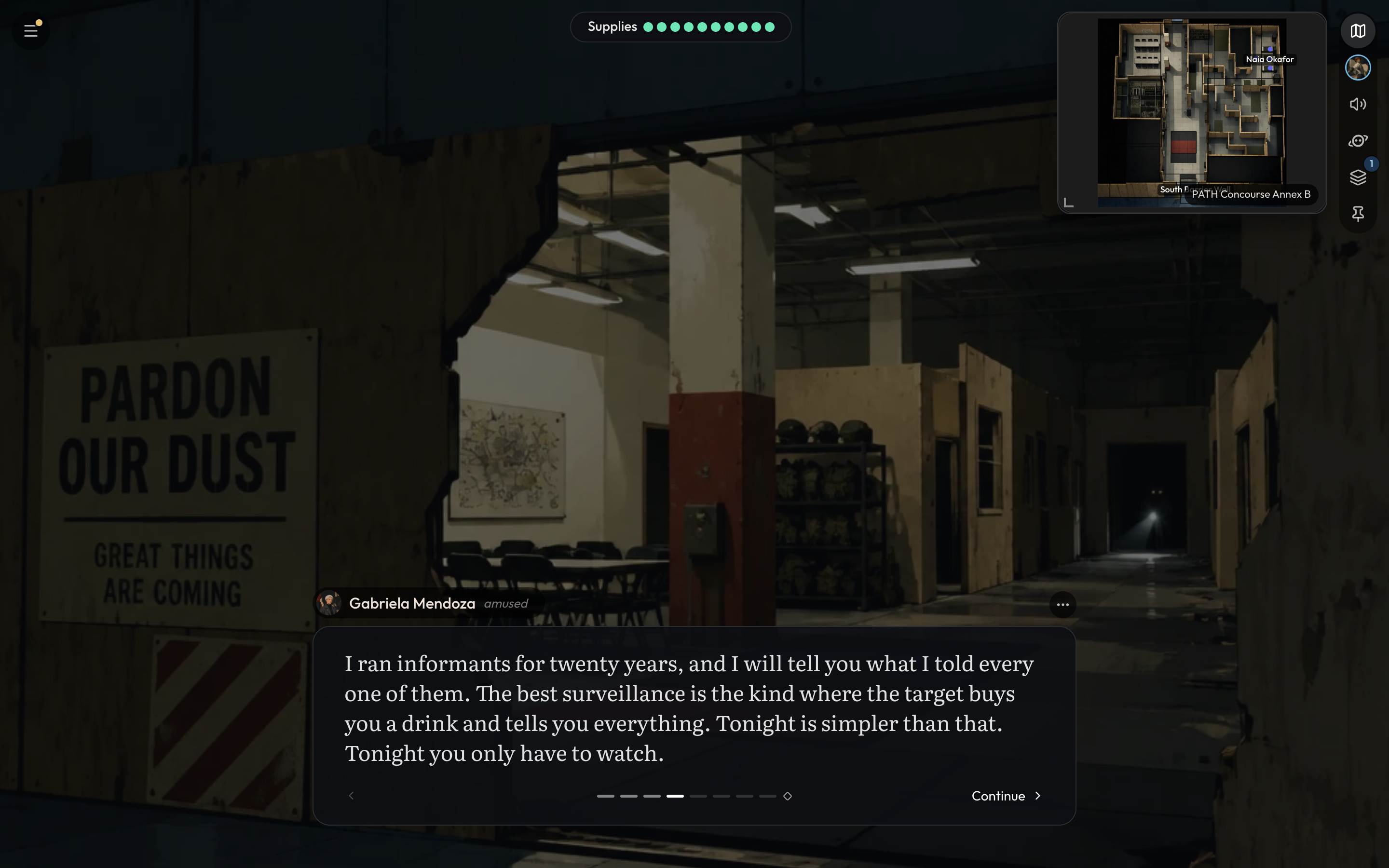
Here's what's on the new screen:
- Replies you page through. Use Continue, tap either side of the scene, or press the arrow keys. The last page ends with Your turn.
- Dice cards for every roll, with the total and the outcome.
- New characters, items and places fill in on their cards as you watch.
- Arrival cards show each new place's picture as you get there.
- One side panel holds your character sheet, the assistant, your trackers and Inspect turn. Close it with Esc, or swipe it away on a phone.
- Inspect turn. Curious why the GM did something? Open Inspect turn from a reply's ⋯ menu to see the rules it used, what it looked up, its dice, and what it changed.
Prefer reading it like a chat? Switch on Chat Only in Quick settings → Display. Replies stream in under your turn, and you can draft your next move while you read.
Game state you can trust
Take a hit, buy some rope and pay for it, and it's all there under the story: HP 24 → 18, + Rope, −11 Gold. Open your character sheet and it already matches.
GM Harness 2 records every wound, every coin and every item the moment it happens. A What changed card shows who lost HP, what you gained or lost, and which objectives are new or done. Money is counted once, so a purchase never comes out of your purse twice. Items you're given are the world's own items. Characters with a sheet stay true to it, from their looks to their secrets.
If you change something by hand between turns, such as your HP, a file, a game setting or a tracker, the GM is told before your next move and plays from the new values.
Trackers
Trackers keep count of everything else the story depends on: the time, your objectives, a ticking clock, a chase, where you stand with a faction. They sit in one widget at the top of the screen. Swipe through them, or tap one to open it.
Every world comes with Craft's own: Time, Objectives, Combat (HP and conditions for every fighter), Party, and Death saves where the world's rules have them. Worlds can add their own on top, such as:
- an alarm clock ticking toward six;
- a rooftop chase pulling toward Away;
- your standing with every faction;
- how close you and a companion have grown.
Trackers in play
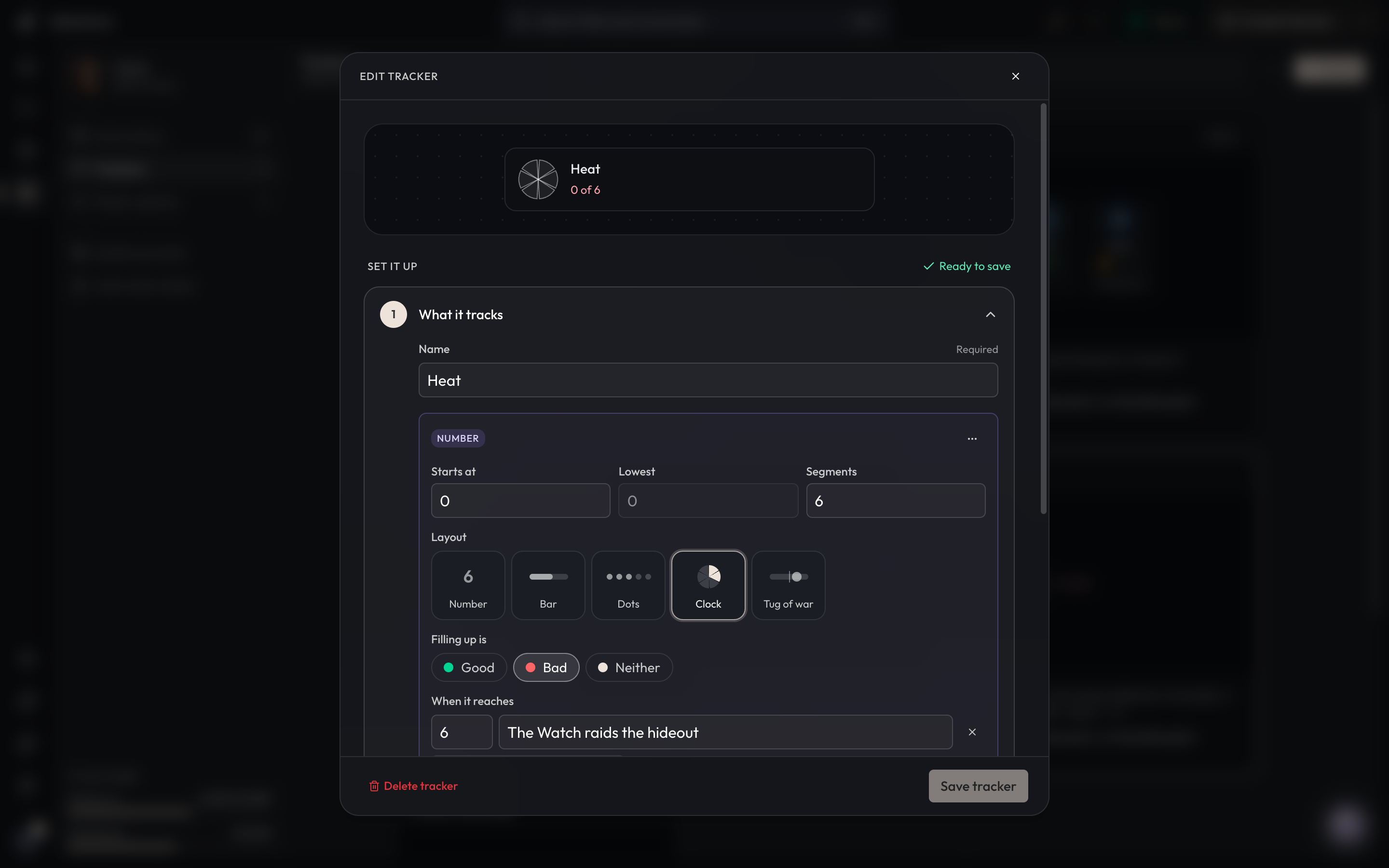
Say your heist world tracks Heat, a six-slice clock where higher is bad. You botch a lock and a guard spots you, so Heat ticks from 2 to 3, and the change card under the story says so. Let it reach six and the Watch raids the hideout.
Making your own
Creators build trackers on the Trackers page of the Game Master place, from a template or from scratch, with a live preview of how they'll look in play. Templates include Alarm, Chase, Reputation, Supplies, Wanted, Deadline and Clues.
A tracker can show:
- numbers, bars, dots or clocks;
- a tug of war;
- a turn order, table, roster or checklist;
- Links between pairs (“Kael & Mira: Bond 3”).
For each one you choose:
- when it appears and when it goes away;
- when the GM updates it: on a trigger, or every turn;
- whether it belongs to a player option.
Write the rules once, such as “rises when the crew draws attention,” and the GM keeps it up to date.
Free art from the Craft Image Bank
Every new place, character and item needs a picture, and drawing one takes time and costs money. The Craft Image Bank fixes both. It's a library of ready-made art the GM searches before it draws anything new:
- It's free. With Use Craft Image Bank (Free) on, which it is by default, every picture is free. You get a match from the bank, or a new picture drawn on the bank's model and added to it.
- It's fast. A match comes back in a fraction of a second, so pictures land almost as soon as the story needs them.
- It fits your world. Art is matched to your world's style and genre.
- Everyone gets a face. Background characters, like the shopkeeper or the guard at the gate, get portraits of their own instead of a letter in a circle.
- New places come with a matching picture and map, found together as a set.
Prefer your own image model? Turn the switch off under Images in Game settings or Quick settings. You'll pay for each picture and pick the model as before, and your pictures stay yours.
Play it your way
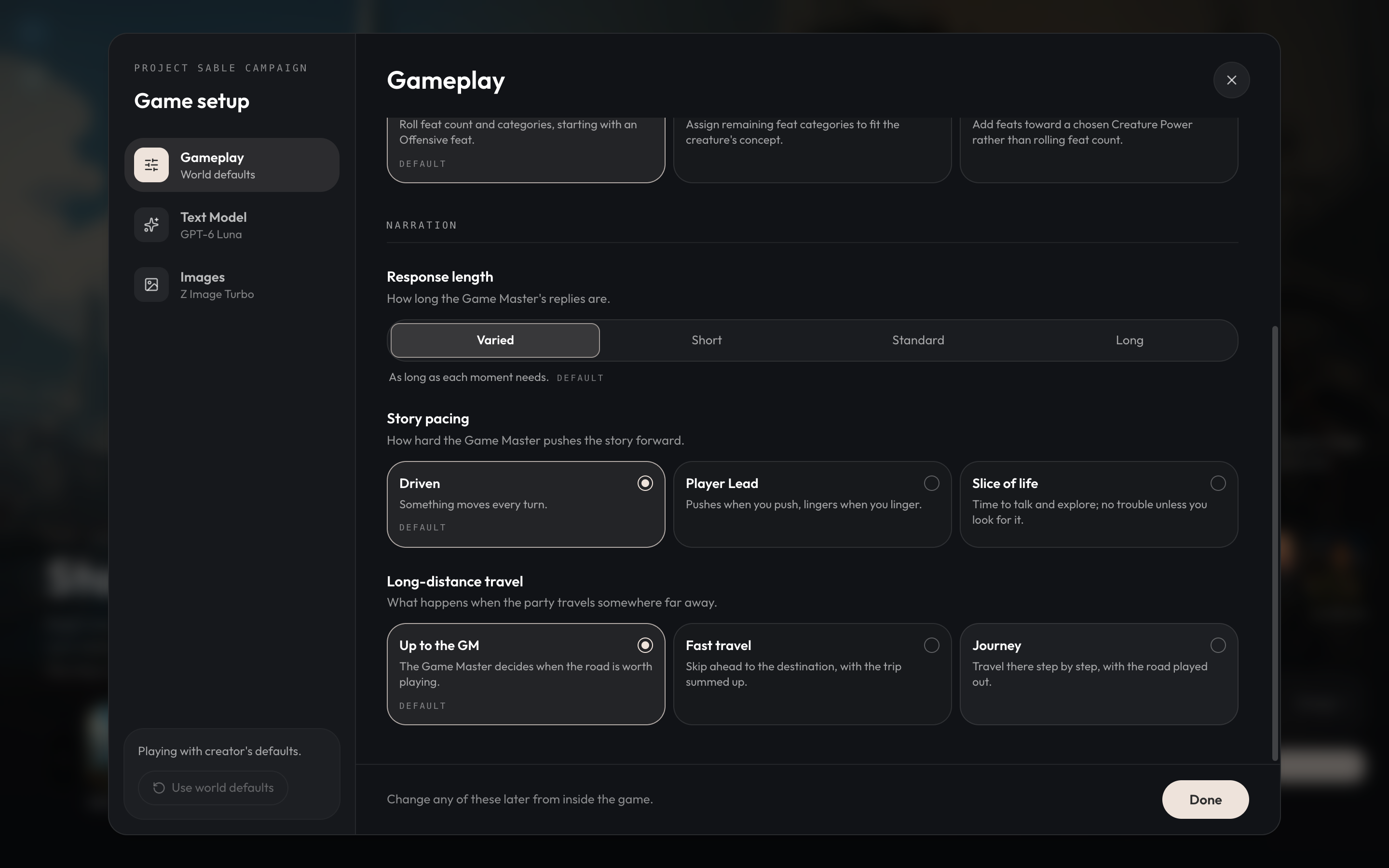
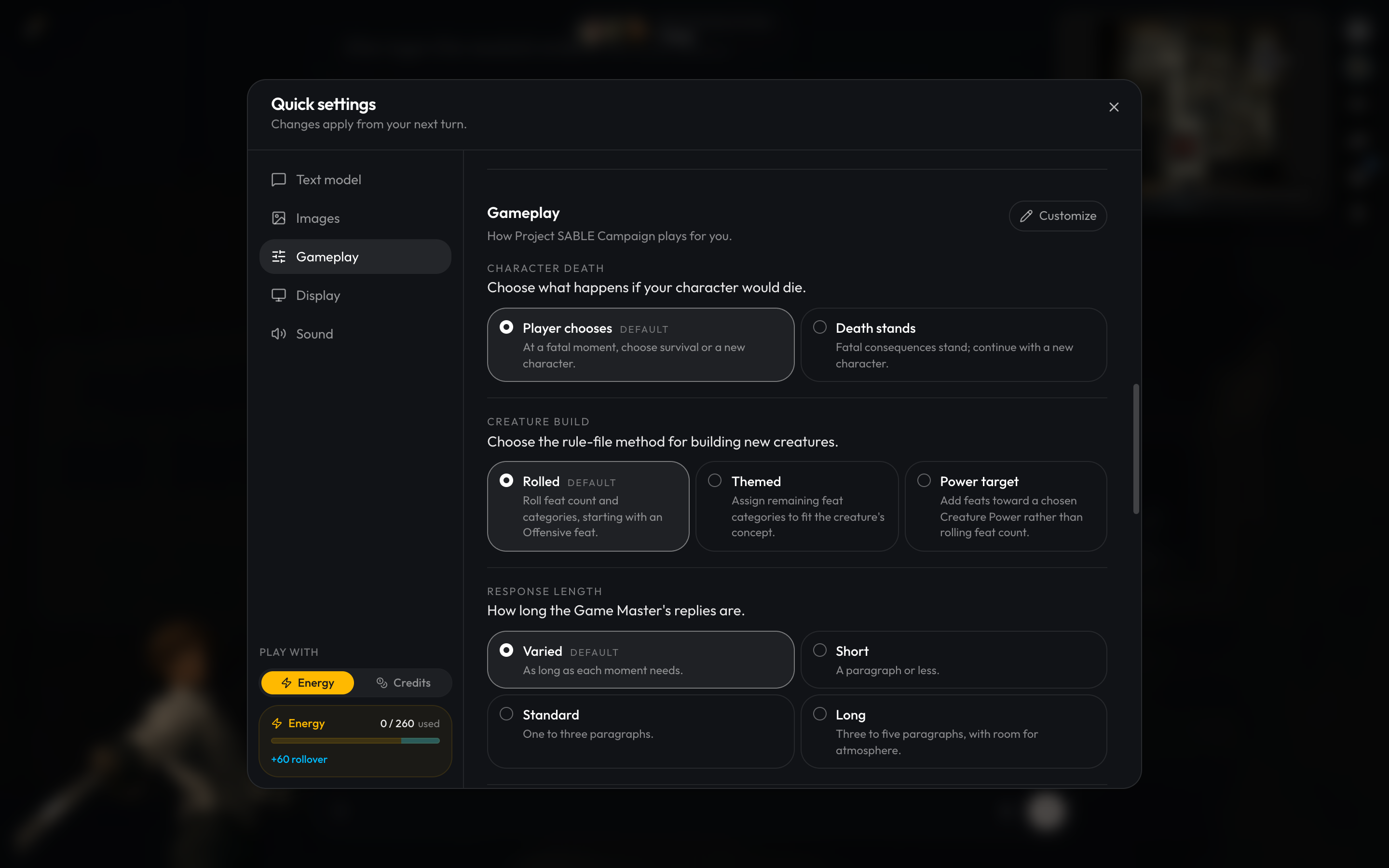
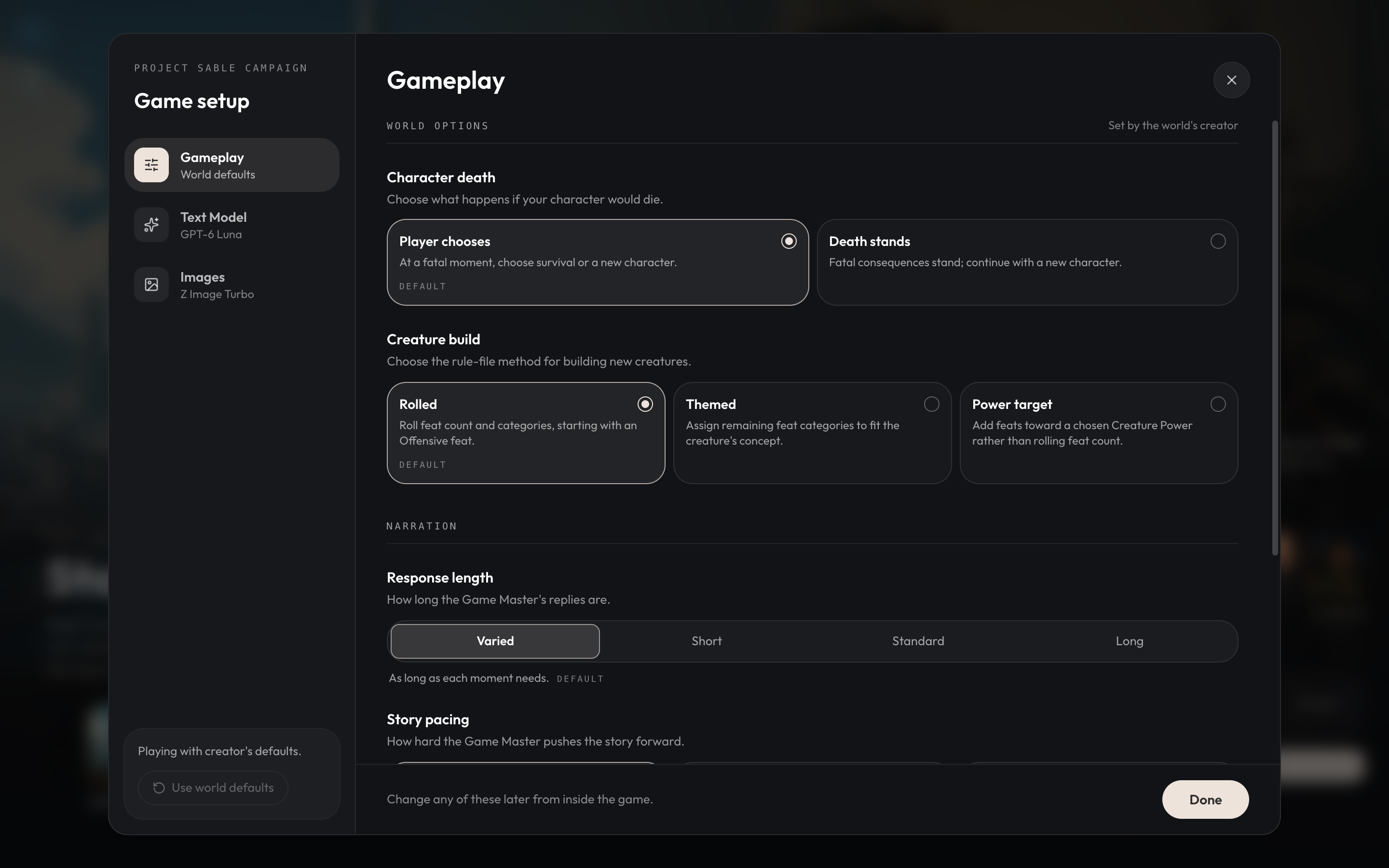
Before you start, open the lobby's Game settings and choose how you want to play. Every world comes with three of Craft's options:
- Response length: Varied, Short, Standard or Long.
- Story pacing:
- Driven: something moves every turn.
- Player Lead: the GM pushes when you push and lingers when you linger.
- Slice of life: time to talk and explore.
- Long-distance travel:
- Up to the GM.
- Fast travel: you arrive in the same reply.
- Journey: you play the road in stages.
Worlds can add their own options too, such as the story's tone or how deadly fights are. You can change your picks mid-game in Quick settings → Gameplay. If you own the game, Customize lets you rewrite the options for that game alone.
For creators
GM Harness 2 runs scenes, maps and memory itself, so your world plays better with less for you to manage.
Five times the triggered instructions
GM Harness 2 worlds have a Game Master place on the workspace rail, marked with a crowned die. Your rules live there now, as GM Instructions: short rules the GM follows every turn, or follows when their moment comes (“When the party enters a city…”).
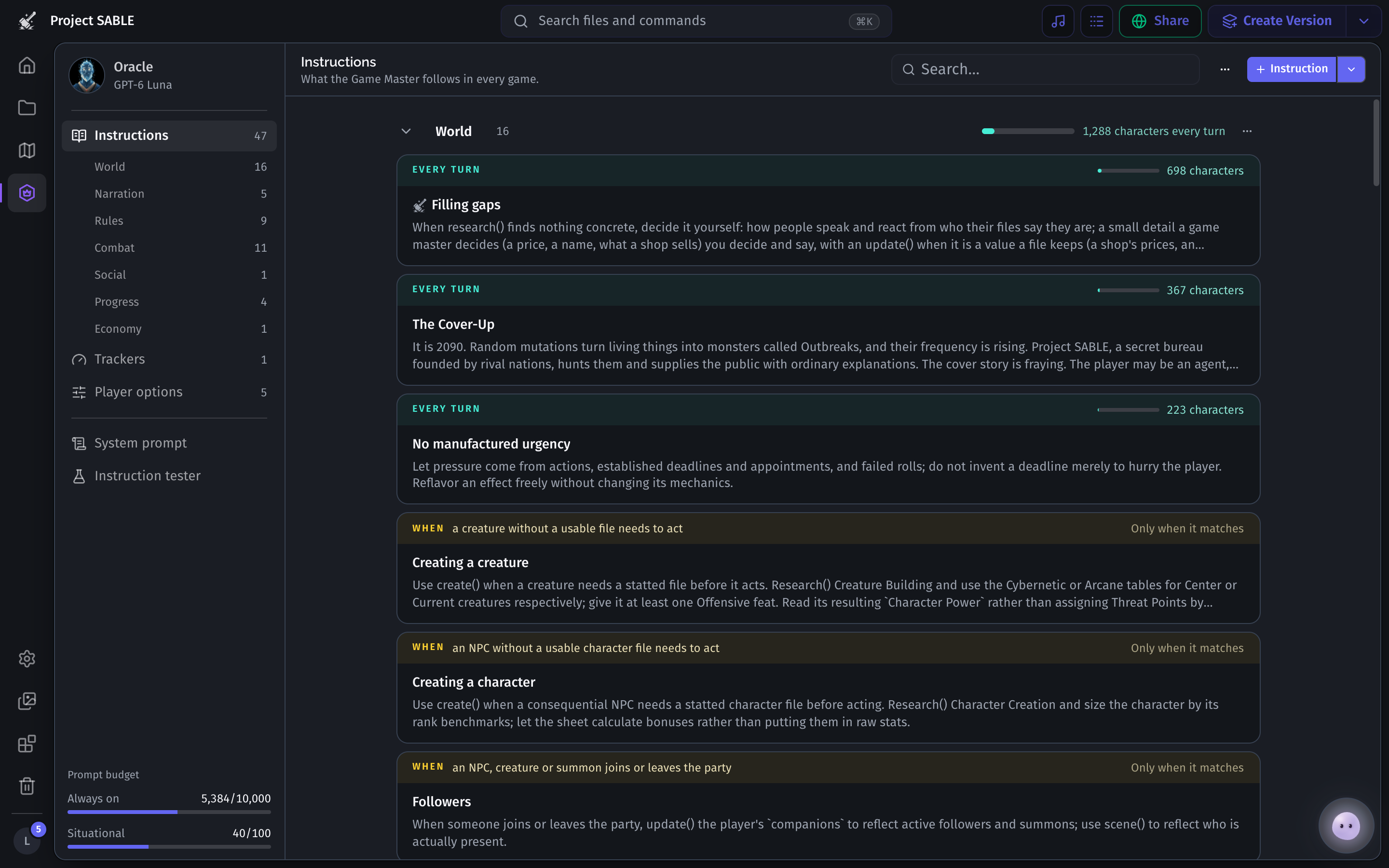
Triggered instructions used to top out at 20 per world. Now you can have up to 100.
We also added an in-depth guide to writing GM Instructions, which should help you make things work in our new system.
Player options
World builders can now create custom player options to let their players quickly customize the way the GM narrates or handles game mechanics. Let the player choose between difficulty modes, narration styles, and more.
Upgrading to GM Harness 2
For players
We expect these first couple of days to be a bit awkward while world builders work on updating their worlds to Harness 2. At launch, all official Craft content will be ready for Harness 2, so you can try it out immediately.
Your existing games will still be supported on V1 until November 15. When the author of the original world publishes a V2 update, you'll be notified and can upgrade your game to V2. If you can't wait, there's a path for you to upgrade the game to V2 yourself, although we recommend waiting for the world builder to do it.
All worlds will be labeled with V1 or V2, and you can browse all V2 worlds here.
For world builders
Existing worlds can upgrade in a few minutes: open your world and choose Start the upgrade. Nothing changes for your players until you publish. We recommend you check out the GM Harness 2 migration guide for an in-depth explanation of how to think about migrating your world. We tried to make migration as easy as possible, but there may still be some tweaking you have to do to get your world to run the way you want it to. It may take some elbow grease, but ultimately this work means that players will have a much better experience and play more in your worlds. Thank you for all the work you are putting in!
For those who have published systems, you will need to upgrade to v2 before new games can be created from your system.
After November 15th, any projects that haven’t been updated to V2 will be marked as unlisted, and any remaining games will need to be updated to V2.
Conclusion
We think GM Harness 2 is the best AI GM experience available today, and we're really excited for you to try it! That being said, there are still rough edges that need to be polished up. We decided to release it early because alpha testers overwhelmingly prefer Harness 2 despite them, and because it gives world builders more time to update their worlds.
In this initial launch, we expect there may be some challenges as players and builders upgrade to the new harness, and things in existing worlds may need to be tweaked or changed to work as expected. This should be a short transitional period, and we think it'll be worth it, as the new harness improves on a lot of shortfalls from the previous one and will continue to get better over time.
If you run into any issues or have any feedback, we encourage you to join the Craft Discord to engage with and get support from developers and community members.
What's coming next
This was a massive upgrade that took a lot of time and testing, which is why there's been a lull in patch notes since the last one. Over the coming weeks, we'll continue to observe and gather feedback on the new harness to tweak and improve it, as well as work on other foundational pieces for improving the play experience, such as support for multiplayer, scripting, and improved music and TTS experiences. Thank you for playing, and stay tuned!