
Patch Notes B0.054 - Harness 2.1, Scripts, Map Improvements, Orbit Improvements, and More
Hey Everyone,
Harness 2 was a big update, but Harness 2.1 is even bigger. With Harness 2, we started getting the foundation of a new architecture into place, but found some blind spots with larger and more complex campaigns. H2.1 goes far beyond solving those problems.
Don’t let the 2.1 naming fool you; this is not just a minor bump. This is one of our biggest updates to Craft yet, and for the first time, we're really starting to see the vision we had for an AI RPG platform come to life.
Harness 2.1 Craft Demo
There are a ton of new features to Craft in this update, but if you don’t want to read this long post and you want to just get playing, check out the H2.1 Craft Demo. It’s still not perfect, but we think it’s the first AI RPG experience that truly feels like playing 5e and is a real step towards the AI RPG experience we’ve all been dreaming of.
Scripts
Scripts are a complete game changer for Craft. Craft is already by far the most customizable AI RPG platform available, but scripts take it to a new level. Scripts allow you to write code that connects to files and state, handling complex logic and bookkeeping perfectly and instantly, every time. Scripts open up totally new opportunities for game mechanics and interactions, so you can truly create any type of game system you want. From story-based games all the way to complex war games, Craft can handle it all with scripts!
Why do we need scripts?
Many worlds put complex mechanics in their GM instructions: how to work out damage, how a crafting system works, how to track a resource, what happens on a critical hit. Every turn, the GM has to read those instructions, remember them and carry out each step correctly in its head, all while telling a good story. That's a lot to ask, it’s slow, and it's where mistakes and inconsistencies creep in.
Scripts take that load off the GM. A script is code that runs your rules exactly the same way every time. Instead of thinking through ten steps, the GM calls the script with the right inputs and the script handles the math, the rolls and the bookkeeping. The GM gets the result back and narrates it.
That makes your game:
- more accurate, because code doesn't forget a step or miscount;
- more consistent, because the same rule gives the same result every time;
- more immersive, because the GM spends its attention on the story, not on arithmetic.
Scripts can also create interactive user interfaces
With scripts, you can create custom UI components to display information, add interactive buttons, and more. Build shops, loot screens, level-up menus, or entirely new experiences. Scripts give you the freedom to make your game truly your own.
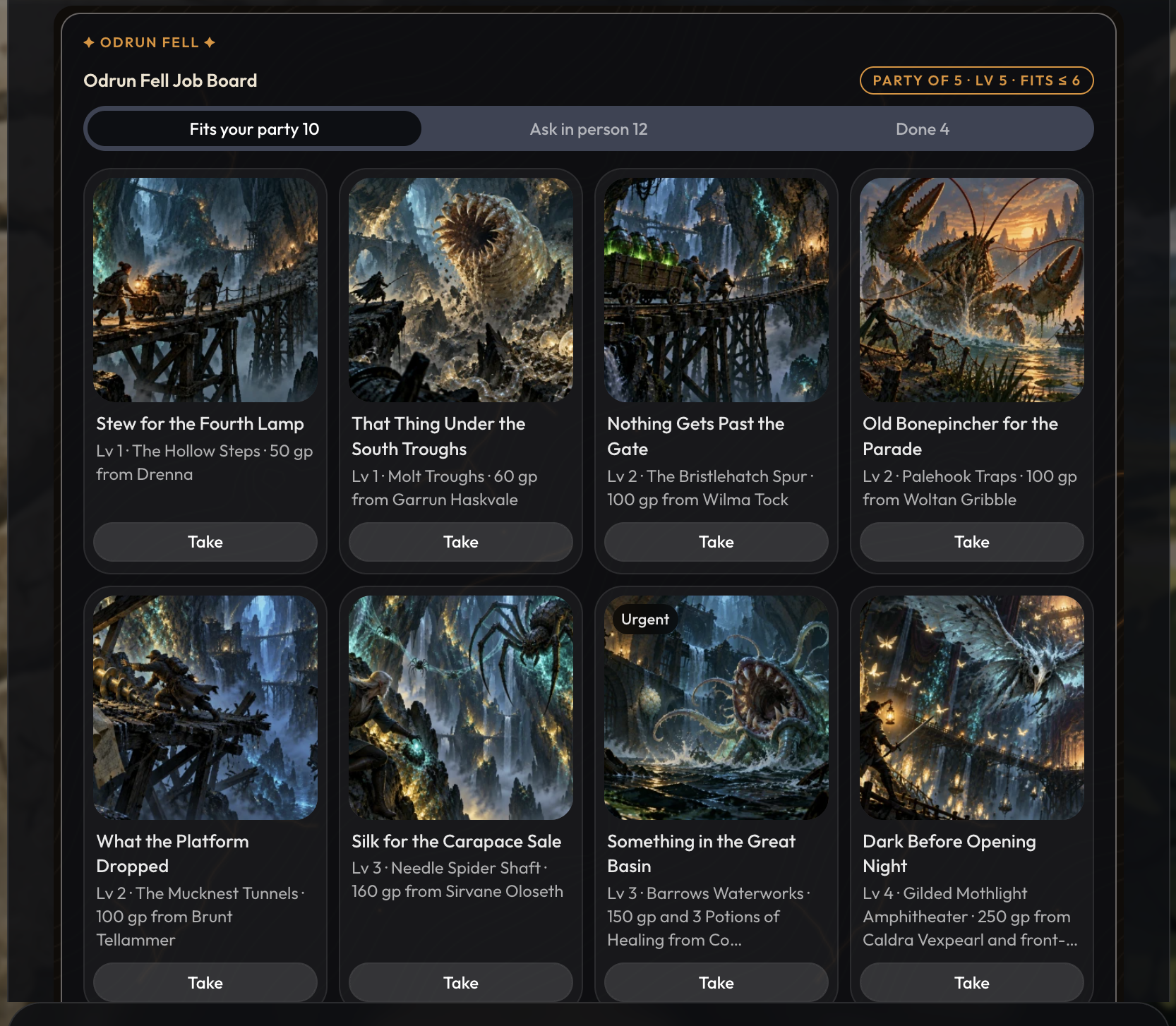
A few things script cards can do now:
- Buttons on a card run your script's actions, and a press can start the next turn.
- Cards can show tiles with a picture, a detail, a badge and a button, laid out as a grid, a list or a row that scrolls sideways.
- A script can ask the player to roll their own dice, then pick up where it left off with the result.
- Scripts can play rolls, effects and reactions on the map, and know where everyone stands and how far apart they are.
What can I use scripts to update?
You can use scripts to update any of the game state, such as files, the current scene, the minimap, or the UI.
So when do I use scripts?
A good rule of thumb: if part of your instructions reads like a procedure (step one, step two, then check this), it probably belongs in a script. Keep your instructions for tone, style and judgment calls, and let scripts do the bookkeeping. You might be wondering, when do I use scripts, and when do I use procedures?
-
Use scripts
- to handle logic that can be written out clearly: If A, do B. If C, do D.
- to output interactive UI
- to give the GM reusable tools
- to handle bookkeeping that happens in that very moment
- to create or update trackers
- to run effects on the minimap
-
Use procedures for
- longer running sets of instructions, such as a general framework for running combat end to end
- situations that have too much nuance, ambiguity, and gray areas for scripts to handle
Check out the Scripts docs for more information on using scripts. For those with external AI subscriptions, we recommend using Claude Code or Codex with the Craft CLI to create scripts, but Orbit is also able to create and modify scripts as well.
To learn more about scripts in detail, check out the documentation here: https://craftrpgs.com/docs/scripts.
Harness Architecture & Tools
One of the biggest issues with H2 was how the GM read and updated files. For H2.1, we went back to the drawing board and rebuilt these tools from the ground up. We also improved how the GM understands your file system, finds relevant information, and keeps your world up to date. Overall, the GM is now much better at navigating your world, pulling in the right context, and accurately updating files.
What was wrong with H2?
Some of you told us the GM struggled to read and update your files. You were right, and here's why.
H2: The semantic update approach
With H2, we tried something different. Instead of having the GM read files and make changes directly, we introduced a semantic update() tool that handled much of the work behind the scenes.
The idea was simple: the GM could describe what needed to happen in plain English, like update("Lysandra takes 6 damage"), and the tool would figure out which files to modify and how.
This had two major advantages. It reduced the amount of file system knowledge the GM needed to keep in context, and it eliminated the need to read a file before making simple updates.
This made the GM more context-efficient and worked well for simple updates, but introduced problems around edge cases and more complex updates as the GM didn’t have enough insight and fidelity into the file system to make some of the changes players were expecting.
H2.1: Giving the GM more control
With H2.1, we've brought back direct GM file reading and editing, introduced better tools for searching through your game, and improved how the GM identifies and references files.
Here’s what changed:
- find(): Checks whether something exists and gets its id. It's a quick search with no AI guessing, and it sees files made earlier in the same turn. It can also list the contents of a folder or find files by type. This replaces the old
list()tool. - read(): Opens a file by its ID and retrieves its actual contents. For locations, it also provides a structured description of the map, including areas, landmarks, exits, and where they lead, helping the GM navigate your world.
- research(): Answers broader questions about your world, now with better citations and file IDs. This makes it easier for the GM to track down the source of information and open or edit the relevant files afterward.
- update(): Makes precise edits to specific fields, without an intermediate AI layer interpreting the GM's instructions. This also applies to scene data, including maps, trackers, and time of day.
- We also rewrote and improved the Craft platform default instructions. Instructions that used to live in our uneditable parts of the system prompts have been moved into our default instructions, which means that more of the system prompt is now editable by you. These new instructions should reduce hallucination rates.
Overall, H2.1 should feel noticeably better at understanding your world, finding relevant information, and keeping your files accurate and up to date.
And if there are specific files you want your GM to reference more consistently, you can always use custom instructions to point it in the right direction.
Prose Rule Enforcement (Experimental)
One of the most common things we see players struggle with is getting the GM to write in a specific style.
While prompting and custom instructions can certainly influence how a model writes, there's a limit to how much they can accomplish. This is especially true for our smaller Core models, which are expected to handle bookkeeping, storytelling, and complex game mechanics, all while being affordable enough to use unlimited every day.
That's a lot to ask of a small model.
Smaller models generally struggle more with following detailed instructions, and even the largest models, like Claude Opus 5.5, have built-in writing tendencies that can be difficult to override through prompting alone.
A common mistake is trying to solve this by adding more and more elaborate instructions. This will only waste your time and energy, and can make your games worse in other aspects.
The problem is that you're fighting against the model's natural tendencies while competing for its limited attention. Even if you manage to fix one writing habit, it will likely be inconsistent, and the additional instructions can interfere with other parts of the game.
We've spent years working on GM prompting, and we know this problem all too well.
That's why we're introducing Prose Rule Enforcement, an experimental feature that takes a different approach to controlling how your GM writes. Alpha testers seemed to love this feature and said that using prose enforcement felt like it made core models feel like much stronger models.
How it works
Instead of relying entirely on the GM to follow your prose instructions, Prose Rule Enforcement adds a separate rewriting step after the GM finishes its turn.
Here's what happens when you enable it:
-
The GM plays its turn. It reads your game, handles rolls, updates files, and advances the story as usual.
-
The GM writes its response. Instead of showing you this response immediately, we treat it as a draft.
-
A second model enforces your prose rules. It checks the draft against your enabled rules and rewrites the response if necessary. The final version is then shown to you.
This separation allows the GM to focus on running your game, while a dedicated model handles your writing preferences.
What you should know
There are a few important things to understand about how this works:
-
Only the wording changes, not the story. The rewrite is designed to preserve the original meaning, intent, and facts of the GM's response. We also run a validation step to check that nothing important was added, removed, or changed, including what characters say and mean. If the rewrite fails validation, you'll receive the original response instead, and the Prose Rules fee for that turn is waived.
-
The rewriting model doesn't know your world. It only sees your message, what the GM did during that turn, and the GM's response. It doesn't have access to your game's full history or memory.
-
Prose Rules are not GM Instructions. They control how the GM writes, not what happens in your game. If you want to change the GM's behavior, decisions, or storytelling logic, continue using GM Instructions.
The tradeoffs
Because Prose Rule Enforcement adds another model call to each turn, there are two tradeoffs:
-
Slower responses. The rewriting model needs the GM's complete response before it can begin, so replies may take noticeably longer. Responses also won't stream word by word. Instead, the full reply will appear once the process is finished.
-
An additional 0.5 Energy per turn. This applies even when the response already follows all your rules and doesn't need rewriting, since the enforcement model still needs to take in all the input context to review it.
How to see what changed
You can inspect what Prose Rule Enforcement did on any turn.
Open Inspect Turn from a reply's menu and navigate to the Steps tab. At the bottom, you'll see whether the response passed as written, was rewritten, or had a rewrite rejected.
If a response was rewritten, you can compare the original and final versions side by side, with the changes highlighted.
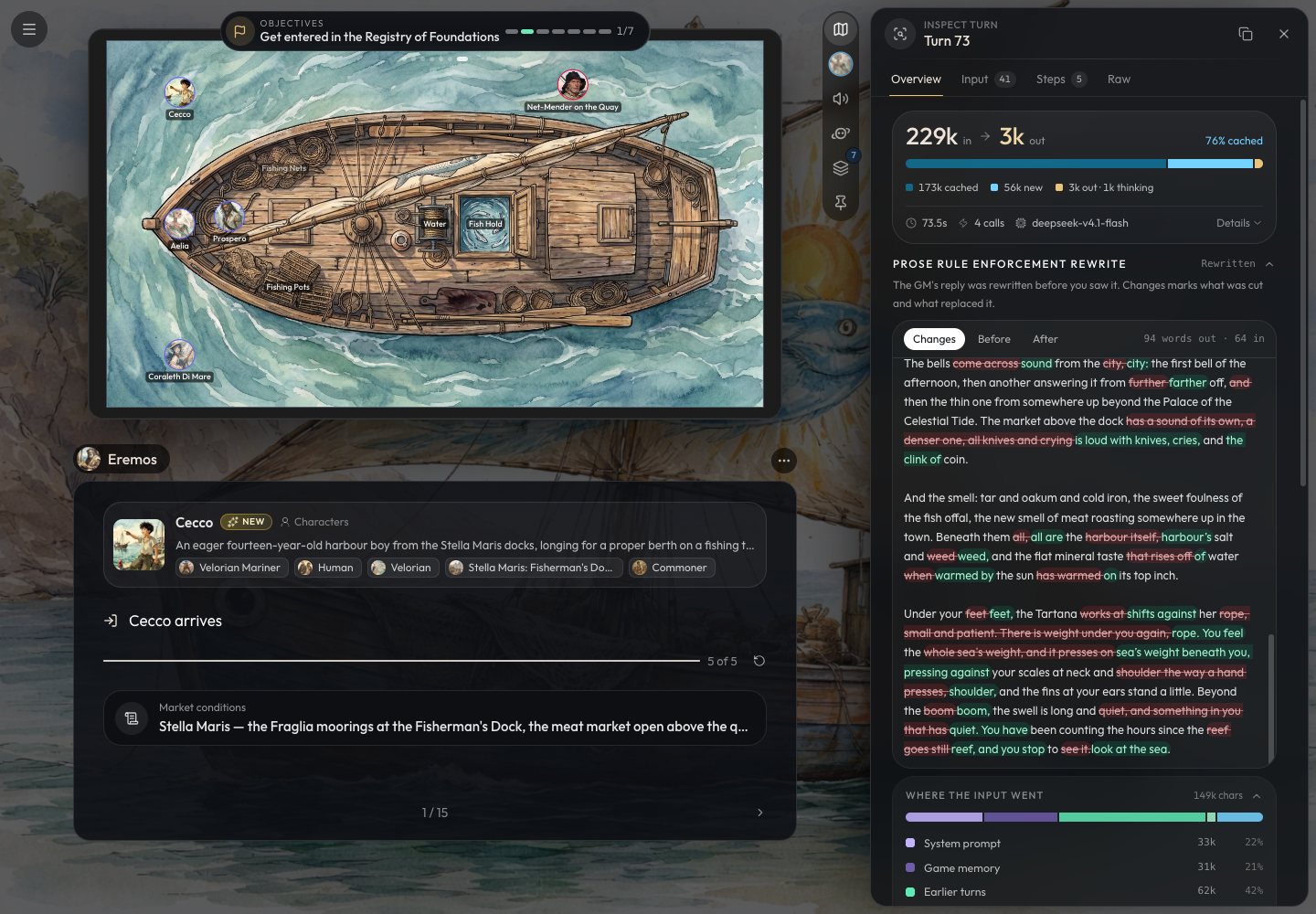
Remove your old prose instructions
If you enable Prose Rule Enforcement, we recommend removing your existing prose-related GM Instructions.
There's no need to make the GM follow the same writing rules twice. Let the GM focus on running your game, and let Prose Rule Enforcement handle the writing style.
Keep any instructions that affect the GM's actual behavior, storytelling decisions, or game mechanics.
Turning it on
This is a player-specific, game-level setting - NOT a project setting, as prose preferences are player-specific.
You can enable it under Player Preferences in your game.
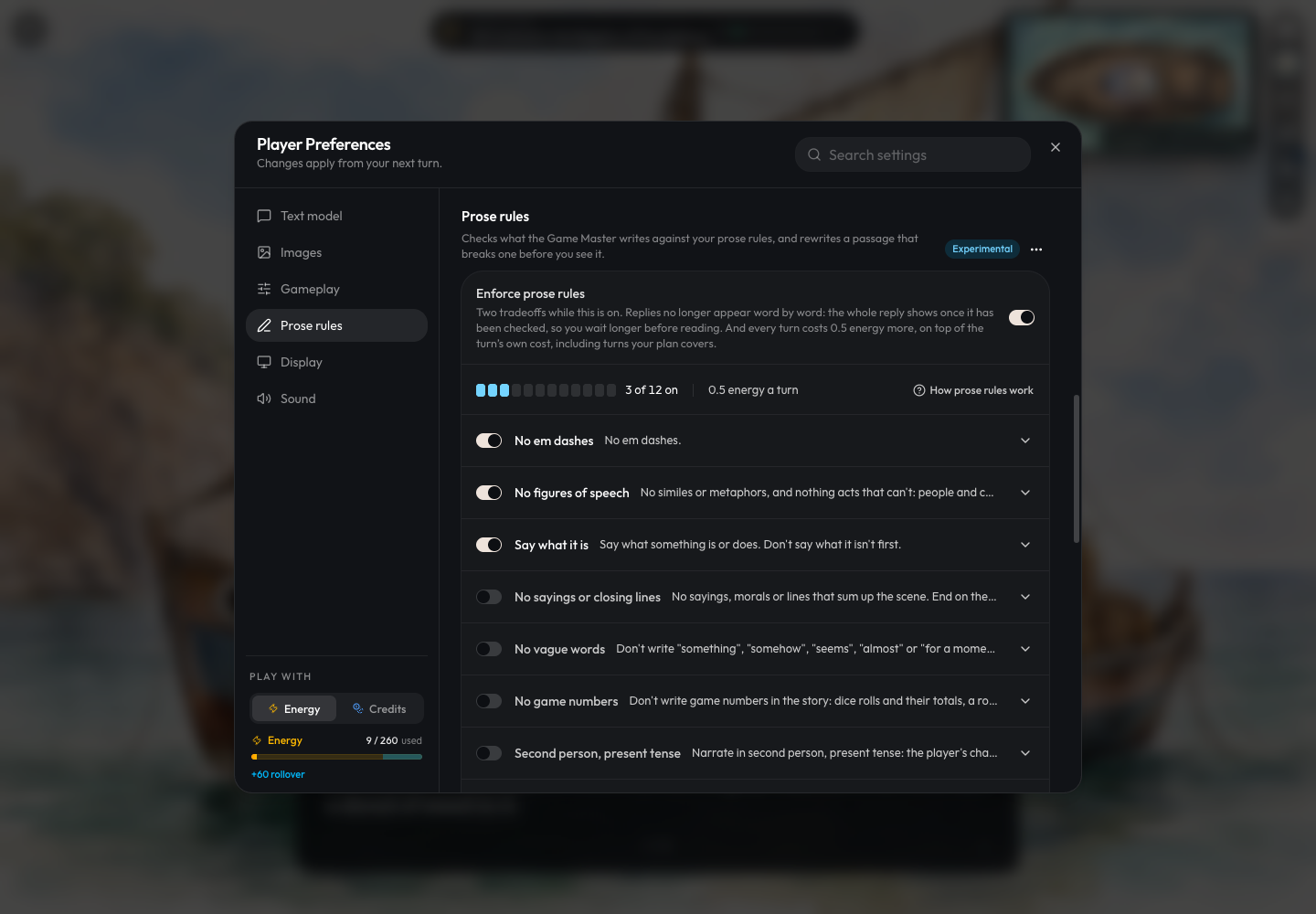
You can also configure your default prose rules in your account settings. These defaults can then be imported whenever you enable Prose Rule Enforcement in a game.
Maps - Terrain, Walls, Exits
Maps get a bit more love in this update as well!
-
Two-way exits. An exit to another place now has an Arrives at field: pick the pin or area on the other map where it lands, or click empty space to drop a new pin there. Leads back here (on by default) makes that spot the other side of the same door, so you no longer have to wire up each direction by hand. Link both ways, Unlink and Go there are one click each. When your character moves through exits in the game, the map will animate the character going to the exit, and appearing at the right place on the other side.
-
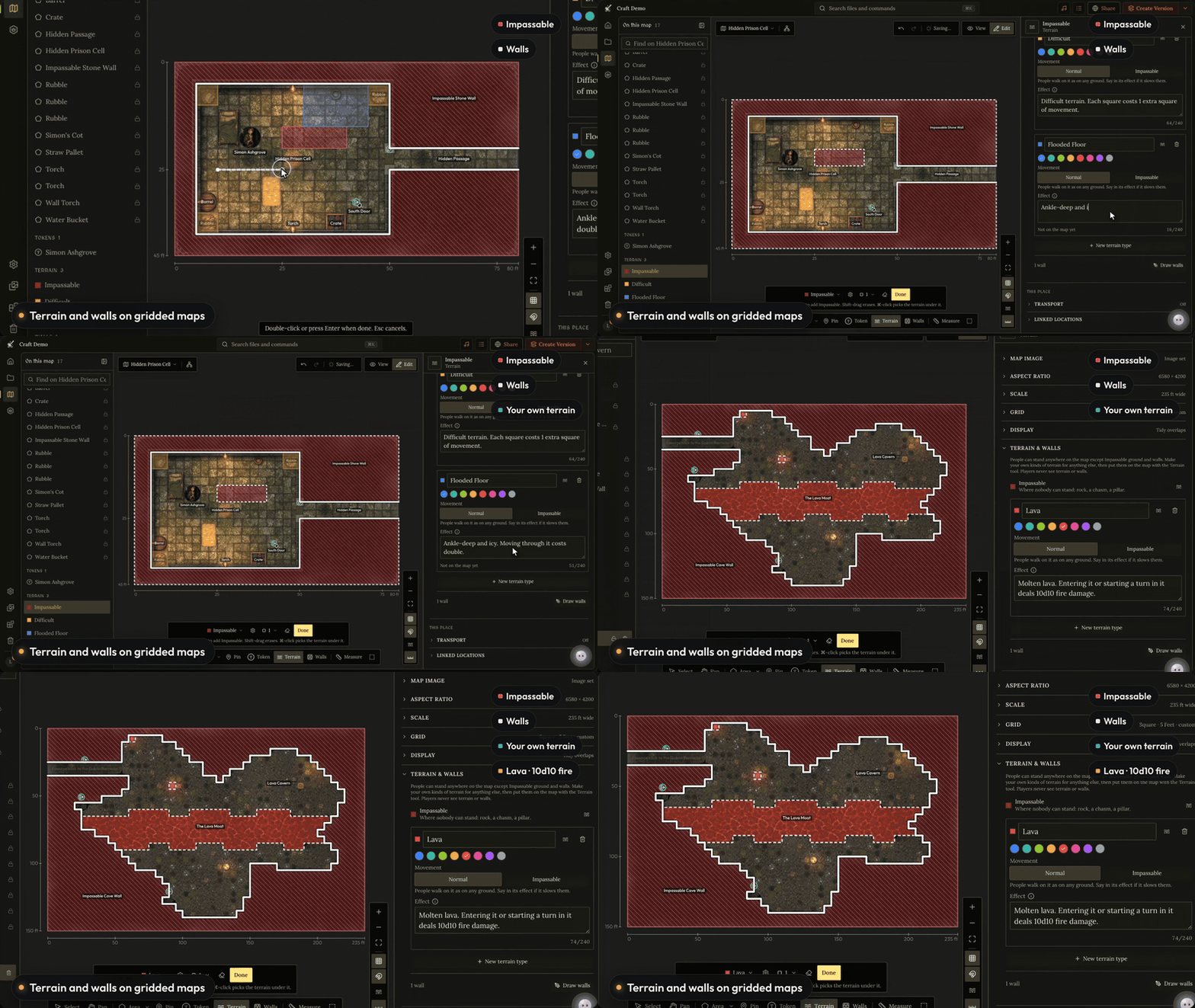
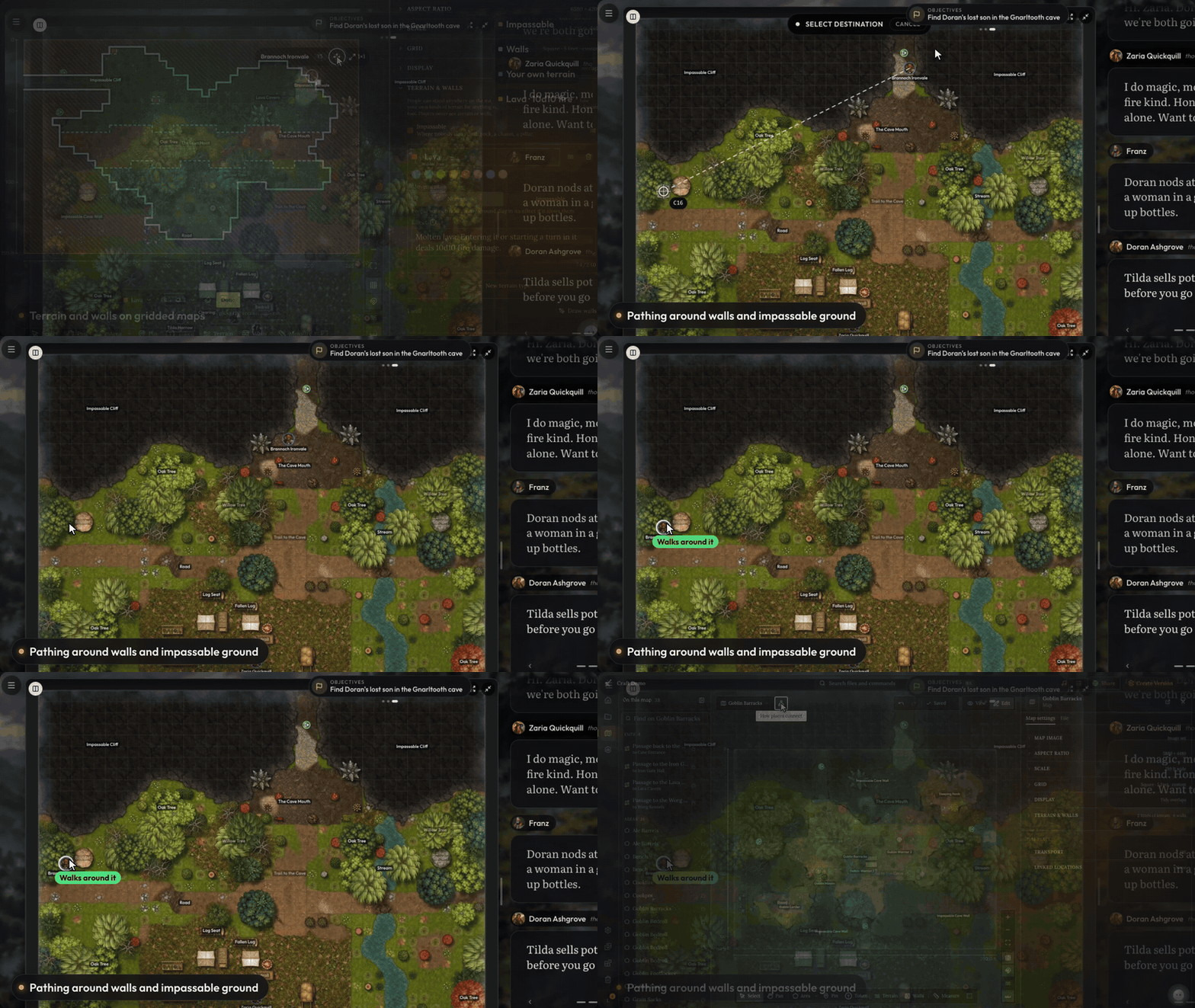
Terrain and Walls. You can now place terrain and walls on gridded maps. You can mark impassable terrain, or create your own custom terrain with custom effects.
-
Pathing. When tokens move on the map, they take into account impassable terrain and walls. You should see your tokens move around them now.
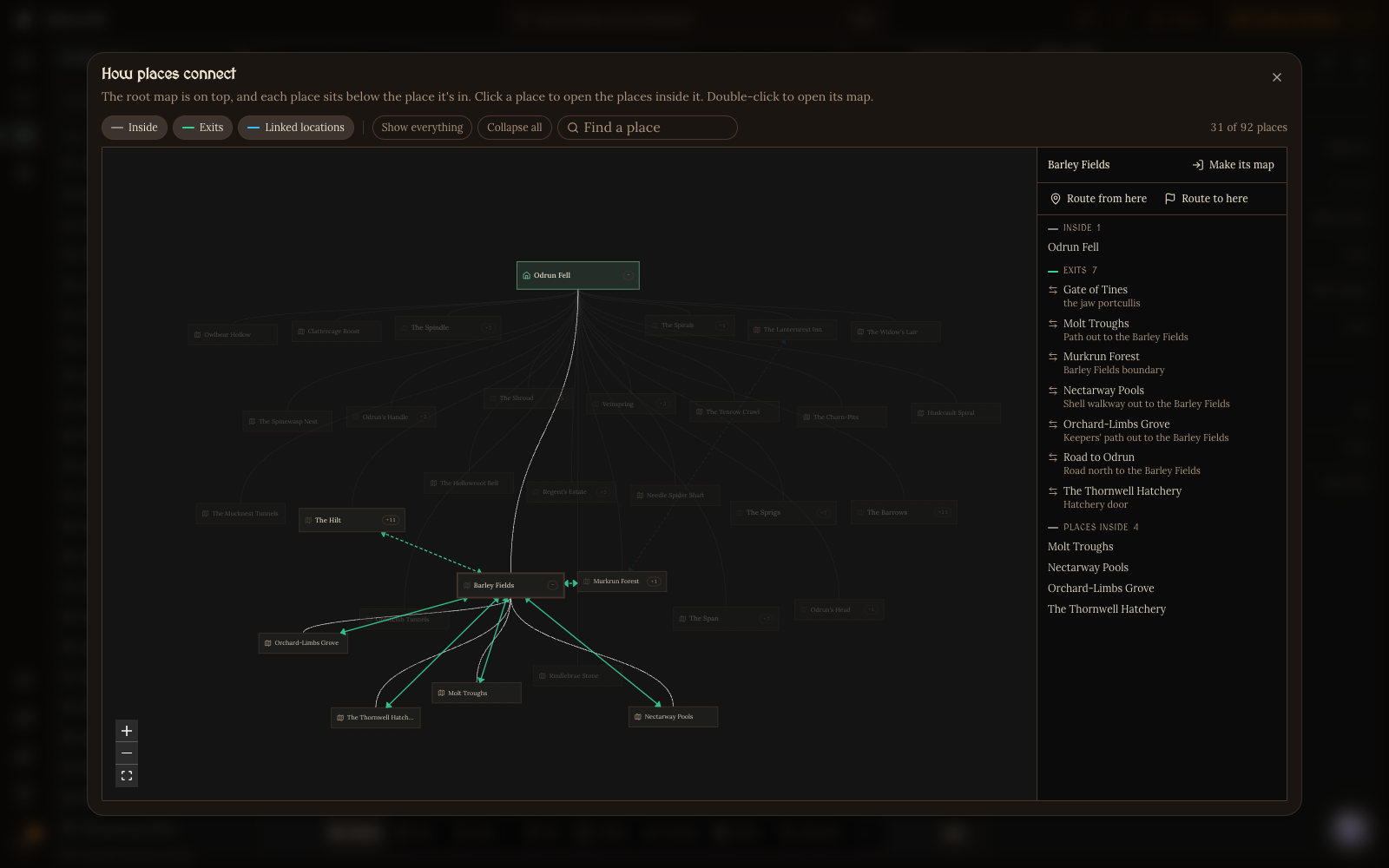
- Location Graph. The map editor has a new graph view showing how every place in your world connects: what's inside what, plus the exits and routes between them. It opens one level at a time, has search, can find a route between two places step by step, and warns you about places a player can't reach or can't get back from.
-
Exits have their own section in the map editor's list, with their icon and a Go to button.
-
Pins made for the other side of a door are named for where they sit ("South Door", "Northeast Ladder"), so their labels don't give away where they lead.
-
Players now see exit markers on the game's map for exits they know about. Hidden exits stay unmarked.
-
The GM knows how long nearby places take to walk to, and uses that when it tells you how far away something is.
-
Arrows, bolts, javelins and other thrown or fired things now look like what they are on the map. Plain weapons no longer glow; only magic and elemental attacks do.
-
We added 0.25 and 0.5 as default token sizes you can quickly switch tokens to.
Orbit + CLI v2
For world builders to build incredible games, we’ve had to ship features that allow for rich mechanics and deep customization. Features like our maps and scripts can be overwhelming for world builders, so we want to make it as easy as possible to work with them by giving Orbit and the CLI the best instructions and documentation to get the job done. This way you can simply describe your end goal, and have AI help you achieve it.
You’ll find that both Orbit and the CLI have a much better understanding of your project and Craft. They’ve been updated to support all of our new features as well.
New Documentation
We've completely overhauled Craft's documentation to give Orbit and the CLI a much better understanding of how Craft works. With clearer, more comprehensive documentation to reference, both tools should be more reliable and effective at helping you build and manage your projects.
Orbit V2
We've rebuilt Orbit from the ground up to be smarter, more capable, and better at understanding how projects work in Craft.
While the GM is designed to tell great stories, manage game state accurately, and keep things running efficiently, Orbit has a different purpose: helping you build better projects in Craft.
To do that well, Orbit needs a deep understanding of how Craft works, what makes a great project, and how to help you bring your ideas to life.
With Orbit v2, we've focused on three major improvements: rebuilding its tools for finding and updating information, overhauling the documentation and instructions it relies on, and making it easier for you to use Orbit to build and improve your games.
Audits
- Audits. Ask Orbit to review your world's GM instructions, maps, or file types. It'll check them against Craft's latest capabilities, identify potential issues, and recommend fixes or make the changes for you.
- Craft Feature Audit. Helps you discover newer Craft features your world isn't taking advantage of yet, and suggests where they could be useful.
- World check. Get a quick overview of your world, including what's in it, what might be outdated, and anything that could make the GM's job harder.
- You can run these audits through slash commands. Just type “/“ in Orbit to see available commands.
Game Debugging
- Debug Turn. Something odd happened in a game? Ask Orbit to debug the turn. It can see what the GM saw, read and changed, and explain why it did what it did. This update really improves Orbit's ability to debug!
- Game History Search. Orbit can now search your game's compactions, so you can ask about something that happened many turns ago.
Working in Projects
- Orbit now has a much better understanding of maps. You’ll find Orbit’s
- It’s now much easier to start new projects with Orbit.
- Orbit no longer asks for permission to delete files or update instructions. We did this because we’ve improved Orbit’s ability to revert to a previous state. If Orbit does something you don’t like, just ask him to revert the change.
CLI > Orbit
Even though we’ve significantly improved Orbit, if you have an external AI subscription, we still recommend using the Craft CLI with a coding agent for the best results. Orbit runs in a different environment, whereas the Craft CLI pulls down your world's files to your local computer. This difference in environment means we have to apply constraints to Orbit that your local coding agents do not have. Orbit is still the most powerful world-building assistant in a browser, but if you're doing some serious world building you can expect the CLI to perform better, especially with these latest updates.
For anyone using the CLI, please reinstall: npm install -g @craftrpgs/cli
Give the new and improved Orbit + CLI a whirl building out a new game, and let us know how it goes!
Game Starts
We also did a quick QoL update for game starts. Creating them should be a lot smoother and more intuitive. There was an awkward thing before where the GM would take a step and reset the scene when starting things, but now the state you have the game start in is exactly what the GM will use. This also makes game starts a little faster now.
DeepSeek V4.1 Flash 1017 in Core
We are now adding DeepSeek V4.1 Flash 1017 to Core. It is the smartest and fastest model in the Core lineup, and of the Core models we tested, it had the highest accuracy with following bookkeeping and can produce some genuinely good narration for a Core model.
Alpha testers were initially hesitant about the model, as many of them did not really enjoy DeepSeek V4 Flash 0731. However, after testing this model, many testers were surprised by how well it performed. There were still some mixed reviews; some testers did not like the way it wrote, but after layering on prose rewrites, it feels like a much bigger model than it is.
Much of our testing and development was built around this model, so we highly recommend you give it a try!
Understanding why the GM did something: More Detailed Turn Inspector + Debug with Orbit / CLI
For world builders, one of the most important things when building a game is understanding why the GM ran a turn the way that it did. So we just added a new turn inspector. This new turn inspector gives you the exact data that we sent to the LLM - you see every last bit of it. This is a bit of a risk for us to do. It makes it easy for competing platforms to come and look at our prompts, or reverse engineer some of our features. We've already seen a lot of the innovations we've shipped appear in other platforms shortly after, so initially, we were a little hesitant to do this. However, we've decided that the most important thing is that world builders have the best tools available to build the best worlds. Being able to inspect a turn and see everything is important for understanding why the GM behaves a certain way. Very often the GM has an annoying behavior, and it turns out it's because of a line in one of your character descriptions, or an instruction you forgot about. With the new inspector, you'll be able to diagnose the issue. In fact, we've made it even easier to do so by giving Orbit and the CLI access to this data as well. You can now hit “Debug with Orbit” in the message menu to quickly debug a turn.
Harness v1 Deprecation
We’re extending support for Harness 1 through the end of November. For folks who did not like Harness 2 when it came out, we strongly urge you to try updating your world to work with Harness 2.1. We invited many people who had issues with Harness 2 initially to the Alpha, and when we asked them if they would prefer to go back to Harness 1 or stick with Harness 2.1, nearly everyone said they prefer 2.1.
If you are having a difficult time getting your world to work with Harness 2.1, reach out to us in Discord and we’ll help you out.
Other Improvements and Fixes
-
Added versioning for GM instructions, handbooks, and preludes.
-
Dead characters' tokens now turn grey with a skull over them.
-
During a fight, everyone in the turn order shows an HP bar, enemies included.
-
Actions are no longer mixed into spoken dialogue.
-
A place the GM invents during play no longer shows the city map by mistake.
-
Dice rolls are smoother: they no longer freeze while the chat is busy, and the numbers always match the dice that landed.
-
When a game pulls an update from its world, GM Instructions now merge item by item: it keeps what you changed in your game and only asks about items both sides changed.
-
GPT Image 2.5 was upgraded to GPT Image 2.6, and Gemini Omni Flash 1.1 was upgraded to Gemini Omni Flash 1.2.
-
The GM can now output clickable links to files.
-
Fixed an issue where custom expressions would not be brought over during CDF imports.
-
Players can disable in-game background blur via the display preferences.